Your finance team is drowning in spreadsheets. Every month-end close, they download data from NetSuite, export reports from Salesforce, and spend hours building complicated VLOOKUPs. By the time they reconcile everything, the data is stale.
As an IT leader, you’re being asked to solve this while also consolidating tools and reducing spending. Adding another vendor isn’t an option.
Fortunately, data integration capabilities that might already exist in your integration platform. Instead of adding another vendor, you can use what you have to eliminate manual reporting, enable real-time insights, and free your teams to focus on strategic work.
In this post, we’ll discuss the 10 most significant benefits of data integration and how to get started.
What is data integration?
Data integration moves data between systems automatically. Instead of manually downloading data from your CRM, ERP, and e-commerce platforms to build reports, data integration automates these flows.
Modern approaches use ELT (Extract, Load, Transform), which:
- Extract data from a source like your CRM.
- Load raw data directly into cloud data warehouses like Snowflake or BigQuery.
- Transform the data using the warehouse’s computing power.
This replaced legacy ETL (Extract, Transform, Load) methods, which required complex transformations before data reached the warehouse.
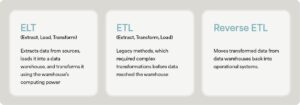
The complete data lifecycle includes reverse ETL, which moves transformed data from data warehouses back into operational systems. When your data team calculates customer health scores in Snowflake, for example, reverse ETL syncs those scores into Salesforce so sales reps can act on them.
10 benefits of data integration
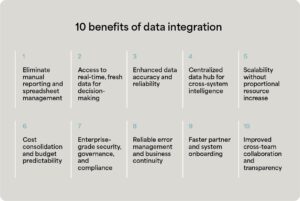
Modern data integration solves operational challenges while positioning IT as a strategic enabler. Here are 10 ways automated data flows transform manual processes into competitive advantages.
1. Eliminate manual reporting and spreadsheet management
Your finance team is spending hours downloading data from your ERP, CRM, and order systems, building complex VLOOKUPs that break constantly.
When someone updates a field name in Salesforce, the formulas break. When NetSuite releases a new version, the export formats change. Each month-end close becomes a firefighting exercise where your team troubleshoots spreadsheet errors instead of delivering insights.
Meanwhile, the reports they finally produce are static snapshots, which are already outdated by the time stakeholders review them. Finance can’t answer follow-up questions without starting the entire process over, and everything gets delayed.
The solution: Data integration automates these data flows, populating dashboards with fresh, accurate information without manual intervention. You can:
- Reduce the support burden from finance teams requesting ad-hoc data extracts
- Free up your team from maintaining complicated custom reporting scripts that break during system updates
- Demonstrate IT’s strategic value by solving a visible business pain point
Real-world scenario
Your CFO needs quarterly board reports showing revenue by product line, customer acquisition costs, and cash flow projections.
With manual processes, finance spends a week pulling data from multiple systems and reconciling numbers.
With automated data flows, dashboards update continuously and the CFO can slice data by any dimension in real time.
“Before Celigo, we manually updated Azure tables every day. Now, it’s completely hands-off — our analysts focus on insights, not imports.”
— IT Director at a financial services company
2. Access to real-time, fresh data for decision-making
Decisions made on last week’s data export create business risk. When executives ask about current performance, manual reporting processes mean you’re always looking backward instead of responding to what’s happening now.
The solution: Data integration provides continuous synchronization, giving stakeholders up-to-the-minute visibility into business operations. You can:
- Position IT as the enabler of data-driven decision-making across the organization
- Eliminate emergency requests for “current numbers” that disrupt your team’s priorities
- Provide executives with self-service access to real-time insights that reduce IT bottlenecks
Real-world scenario
Your e-commerce operations leader manages inventory across Amazon, Shopify, and your wholesale channel.
Without real-time data integration, inventory counts update manually once per day, leading to overselling on one channel while product sits in stock for another.
With continuous synchronization, however, inventory updates flow instantly across all channels, preventing stockouts and overselling.
3. Enhanced data accuracy and reliability
Finance has zero confidence in reports. Everyone applies different spreadsheet formulas, files get out of sync, and you’re pulled into “which version is correct?” meetings that waste everyone’s time.
The solution: Data integration includes automated pipelines with consistent validation, transformation, and quality rules. You can:
- Reduce time spent troubleshooting data discrepancies between systems
- Eliminate blame directed at IT when finance discovers reporting errors
- Establish IT as the driver of data quality and governance standards
Real-world scenario
During month-end close, your finance team manually reconciles data between NetSuite and your billing system. Transposed numbers, duplicate entries, and timing differences create discrepancies that take days to resolve.
With manual processes, finance struggles with formula discrepancies and spends days reconciling.
With automated data consolidation, built-in validation rules catch errors immediately, flag exceptions for review, and maintain a complete audit trail. Month-end close accelerates and IT stops firefighting mismatched data issues.
4. Centralized data hub for cross-system intelligence
Data siloed across disconnected systems creates an incomplete picture of business performance. Sales sees customer data in Salesforce, finance tracks revenue in NetSuite, operations monitors fulfillment in your warehouse management system, support reviews tickets in Zendesk—but nobody can answer questions that span these domains.
The solution: Data integration creates a centralized data warehouse serving as a single source of truth, accessible to multiple systems and teams. You can:
- Position yourself as architect of enterprise data strategy
- Enable advanced analytics and AI initiatives that require unified data
Real-world scenario
Your product team needs to understand which features drive retention. This requires combining product usage data from MongoDB, subscription data from your billing system, support ticket data from Zendesk, and marketing touchpoints from HubSpot.
Without centralized integration, analysts spend weeks manually combining datasets.
With a data warehouse fed by automated pipelines, the analysis updates continuously and can be sliced by any customer segment.
“With Celigo, all our operational data flows into BigQuery seamlessly. We finally have a single source of truth for finance, sales, and marketing.”
— Analytics Director at a software company
5. Scalability without proportional resource increase
Your CFO wants to know why you need more headcount just to move data. Business growth shouldn’t require hiring additional analysts and operations staff simply to handle increased reporting volume.
The solution: Data integration platforms scale with transaction volume without additional staff, handling peak loads automatically. You can:
- Prove IT infrastructure supports business growth without linear cost scaling
- Avoid requests for additional IT headcount to maintain data pipelines
- Demonstrate ROI by showing operational efficiency gains from automation investments
Real-world scenario
Your e-commerce business scales from 1,000 to 100,000 daily orders.
With manual processes, you’d need to hire more operations staff just to process order data, update inventory, and manage fulfillment coordination.
With automated data flows, the platform handles increased volume without additional resources—your team focuses on strategic improvements instead of transaction processing.
This benefit addresses IT leaders at growth-stage companies who need to demonstrate how technology enables revenue scaling without proportional infrastructure costs.
6. Cost consolidation and budget predictability
Multiple point solutions create tool sprawl—separate vendors for application integration, data pipelines, EDI management, and workflow automation. Each tool requires its own contract negotiation, security review, training program, and support relationship.
The solution: Integration platforms that handle both application integration and data integration consolidate capabilities on a single platform. You can:
- Reduce vendor management overhead and contract negotiation burden
- Demonstrate cost savings to CFO through tool consolidation
- Simplify security reviews and compliance audits with fewer platforms to govern
Real-world scenario
Your organization currently pays for separate tools: an iPaaS for application integration, Fivetran for data warehouse loading, a reverse ETL tool for operational analytics, and an EDI provider for trading partner connections. Each renewal brings price increases.
With manual vendor management, you’re negotiating four separate contracts and managing multiple security reviews.
With a consolidated integration platform, you eliminate three vendor relationships, reduce training complexity, and get predictable pricing based on connections rather than transaction volume.
Celigo replaced two expensive connectors for Redshift and Azure — we’re saving over six figures annually while improving reliability.” — VP of Data Engineering at a large manufacturer
7. Enterprise-grade security, governance, and compliance
Spreadsheet-based reporting provides no control over who accesses sensitive financial data. Email attachments containing customer information create security and compliance risks. Manual processes lack audit trails showing who modified data and when.
The solution: Data integration platforms provide role-based access control, complete audit trails, and compliance certifications. You can:
- Meet compliance requirements (SOX, HIPAA, GDPR) without custom development
- Reduce security risks from uncontrolled spreadsheet sharing
- Provide audit-ready documentation showing complete data lineage
Real-world scenario
During audit preparation, your compliance team needs to demonstrate data handling procedures.
With spreadsheet-based processes, you can’t prove who accessed financial data or track changes to calculations.
With governed data flows, every modification has an audit trail, access follows role-based permissions, and the compliance team can generate reports showing exactly how data moves through systems.
8. Reliable error management and business continuity
Custom scripts can break overnight, API rate limits cause workflows to fail, and system outages interrupt data flows. Sometimes, nobody knows until the CEO asks about missing dashboard data.
The solution: Modern integration platforms provide AI-powered error classification, automatic recovery, and proactive monitoring. You can:
- Eliminate 2 AM alerts about broken data pipelines.
- Reduce developer time spent debugging and manually reprocessing failed workflows.
- Shift from reactive firefighting to proactive system management.
Real-world scenario
Overnight, an API change breaks hundreds of data flows feeding executive dashboards.
With custom scripts, developers spend their morning debugging and manually reprocessing failed records.
With AI-powered error management, the platform identifies the issue, classifies it as an authentication error, pauses affected flows, alerts the operations team with specific remediation steps, and automatically retries once credentials are updated.
Call out box:
Celigo’s AI-powered error management system can automatically detect and resolve common errors, including:
- API throttling: Platform automatically pauses when hitting rate limits, waits for the reset window, then resumes processing
- System downtime: Platform queues workflows, monitors API availability, and resumes automatically when systems recover
- Authentication errors: AI classification identifies expired credentials and alerts the appropriate team with clear resolution steps
9. Faster partner and system onboarding
Adding a new sales channel, acquiring a company, or launching in a new market requires connecting additional systems to your data infrastructure. With custom-built integrations, each new connection requires weeks of development, testing, and deployment.
The solution: Integration platforms with pre-built connectors and reusable templates accelerate new system onboarding. You can:
- Enable business agility by reducing time-to-integration from months to days
- Support M&A activity by quickly integrating acquired company systems
- Free development resources for strategic projects instead of repetitive integration work
Real-world scenario
Your e-commerce business decides to expand to Amazon Business (B2B marketplace).
With custom integration development, this could require six to eight weeks of development time, testing, and deployment.
With a pre-built connector and reusable order-to-cash templates, you configure the integration in days and start processing B2B orders immediately.
“We were up and running with a live BigQuery integration in less than two weeks — unheard of with our previous tools.” — BI Lead at a mid-sized financial services company
10. Improved cross-team collaboration and transparency
When data flows are invisible—buried in custom scripts, managed by individual developers, or scattered across multiple tools—business teams can’t understand what’s happening with their data. Questions about data freshness, transformation logic, or system dependencies require tracking down the person who built the integration.
The solution: Modern integration platforms provide visual workflow builders, centralized monitoring, and self-service capabilities that improve collaboration between IT and business teams. You can:
- Reduce dependency on IT for routine monitoring and status questions
- Enable business technologists to understand and monitor data flows without technical expertise
- Improve alignment between IT implementation and business requirements through shared visibility
Real-world scenario
Your marketing team asks why customer segment data in HubSpot doesn’t match what they see in reports.
With custom scripts, the data engineer needs to review code, explain transformation logic, and manually verify the pipeline.
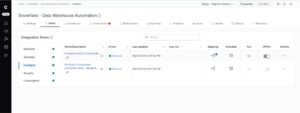
With a visual workflow builder, the marketing operations manager can see exactly how data flows from the warehouse to HubSpot, which transformations apply, and when the last successful sync occurred.
Celigo transformed how we report across departments. Everyone’s looking at the same live data — finance, sales, operations — no discrepancies.” — Senior Financial Analyst at a technology company
Different types of data integration approaches
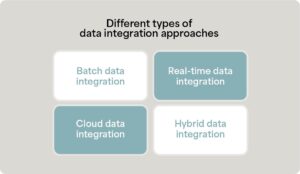
Understanding different data integration approaches helps you choose the right strategy for specific business requirements.
- Batch data integration moves data on scheduled intervals such as hourly, daily, or weekly. Finance teams running nightly data consolidation for morning reports typically use batch integration.
- Real-time data integration synchronizes data immediately as changes occur in source systems. E-commerce inventory synchronization across sales channels requires real-time integration to prevent overselling.
- Cloud data integration uses cloud-based platforms to connect cloud applications and data warehouses without on-premise infrastructure. Organizations with cloud-first technology stacks typically adopt cloud integration platforms.
- Hybrid data integration connects cloud applications with on-premise systems. Manufacturing companies with legacy ERP systems that need to integrate with modern cloud platforms use hybrid approaches.
How Celigo enables enterprise data integration
When choosing a data integration platform, look for a solution that can prevent tech stack bloat and create cross-system workflow automation.
Celigo provides a comprehensive integration platform that handles data integration alongside application integration, workflow automation, and B2B/EDI management, eliminating the need for multiple specialized tools.
- Unified platform for complete data lifecycle: Celigo supports both ELT (loading data into warehouses like Snowflake, BigQuery, and Redshift) and reverse ETL (distributing transformed data back to operational systems), using the same visual Flow Builder interface you use for application integrations.
- Pre-built connectors and maintained infrastructure: Access 1,000+ pre-built connectors for ERPs, CRMs, e-commerce platforms, and data warehouses. Unlike purpose-built data integration tools that only move data one direction, Celigo handles bidirectional data flows, application workflows, and trading partner EDI on a single platform.
- AI-powered error management: Celigo’s error management system automatically classifies and resolves common data integration issues such as API throttling, temporary outages, and authentication errors. This reduces manual troubleshooting and protects business-critical data flows.
- Predictable pricing model: Unlike transaction-based pricing that scales unpredictably with growth, Celigo’s pricing is based on connections and flows, providing budget predictability as your business scales.
Whether you need to consolidate financial data for reporting, sync inventory across sales channels in real-time, or distribute customer insights from your warehouse back to operational systems, Celigo provides advanced workflow automation capabilities that span the complete integration spectrum.
Stop managing data and start driving strategy with data integration
Modern businesses can’t afford manual reporting, stale data, or fragmented integration tools. As an IT leader, you’re positioned to solve finance’s spreadsheet crisis while demonstrating IT’s strategic value without adding another vendor to manage.
The competitive advantage belongs to organizations with real-time insights, automated workflows, and consolidated platforms.
The question isn’t whether you need data integration, because you do. Instead, the question becomes whether or not your current approach positions IT as a strategic enabler.
→ Ready to transform manual reporting into real-time intelligence? Schedule a demo to see Celigo in action.