Celigo MCP servers
Enterprise-grade MCP servers for AI agents
Let AI agents complete approved work across systems using the Celigo workflows you already trust, without building or maintaining separate MCP infrastructure.
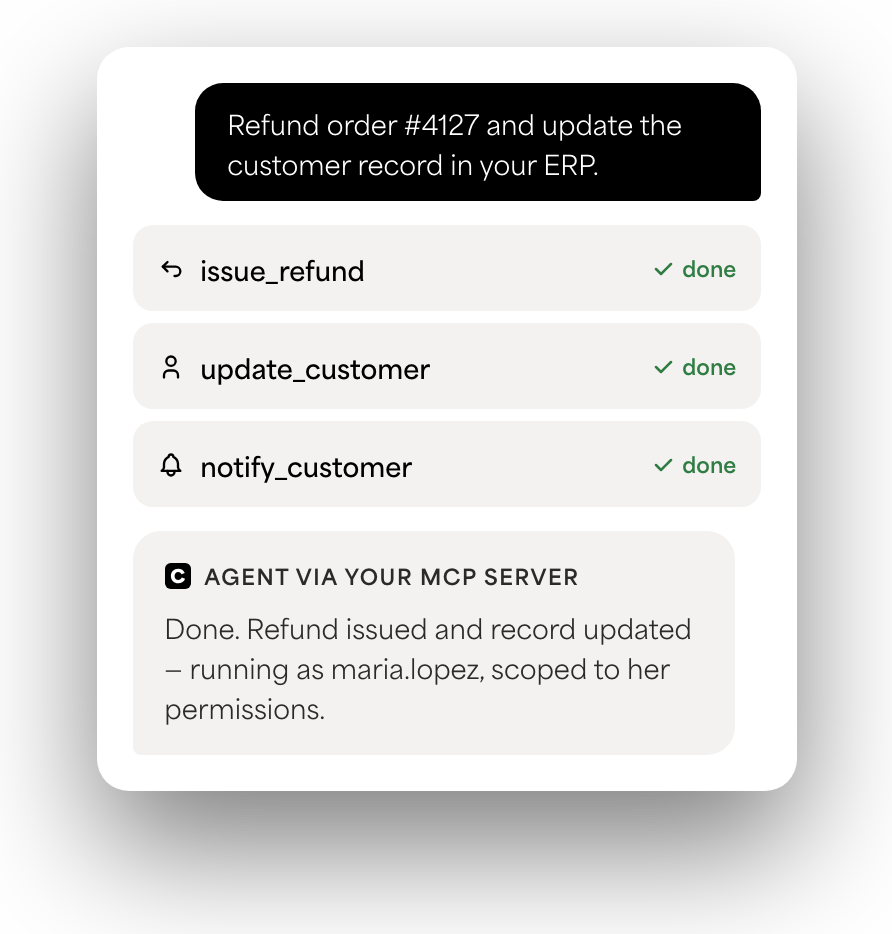
Refund order #4127 and update the customer record in your ERP.
Agent via your MCP server
Done. Refund issued in your ERP and the customer record updated — running as [email protected], scoped to her permissions.
Approved actions only, logged with real user identity
Why enterprise MCP servers need governance, not just connectivity
MCP provides AI agents with a standard way to access enterprise systems. But as MCP access expands beyond developers to more agents, assistants, and business users, connectivity alone is not enough.
Enterprises need to control who can connect, which capabilities they can use, how requests are logged, and how usage is monitored.
Celigo’s MCP server provides that governance at the server layer. Teams can expose approved tools, APIs, prompts, and resources through Celigo, assign access by user, group, and capability set, review request activity, and track usage as adoption grows.
AI agents get the access they need, and enterprise teams keep the control they require.
Why governance built for humans doesn’t hold for agents
Most access controls assume how people behave: occasional actions, reviewed by other people, with judgment applied before anything happens. Agents break each of those assumptions.
Scale
A person might take dozens of actions a day. An agent can take thousands a minute, faster than any manual review process can keep up.
No judgment layer
A person notices when something looks wrong, even without being told to check. An agent only does what it’s configured to do. If a boundary isn’t written down as a rule, the agent has no reason to treat it as one.
Borrowed identity
Agents have traditionally acted under a shared service account. To the system on the receiving end, every action looks identical, with no way to tell which agent, run, or user actually triggered it.
Non-deterministic behavior
A script does the same thing every time, which is what makes testing it once meaningful. An agent can take a different path through the same task on different runs.
Built on what you already run
Celigo MCP server
Celigo’s MCP server exposes the systems, integrations, and cross-system workflows your team has already built, not a separate set of connections built specifically for agent access.
Agents get access to approved business actions, checking order status, updating a customer record, running an approved workflow, not unrestricted access to the systems those actions touch.
Any MCP client
Works with any AI agent, today and tomorrow
Celigo’s MCP server exposes the tools and APIs you build in Celigo to any MCP-compatible client, including AI assistants like Claude, ChatGPT, Copilot, Gemini, Mistral, Grok, and DeepSeek, agent frameworks and platforms like LangChain and Hugging Face, and the custom agent your team builds next quarter.
- Claude
- ChatGPT
- Copilot
- Gemini
- Mistral
- Grok
- DeepSeek
- LangChain
- Hugging Face
- Your custom agent
Composite tools
How a Celigo MCP server connects your composite tools to AI agents
The tools and connections you’ve already built in Celigo, 1,000+ app connections, reusable tools, custom APIs, can be exposed as a hosted MCP server with no custom backend and no separate runtime to maintain.
Because these are composite tools, they can reduce the number of agent calls, limit unnecessary data exposure, and keep cross-system execution within workflows the enterprise controls.
How it works
How Celigo MCP servers work: build, host, and govern
01
Build: Create approved capabilities
Start with the integration logic your team already manages in Celigo: app connections, APIs, tools, prompts, and resources.
Package the capabilities agents are allowed to use, such as checking order status, retrieving customer data, updating a record, or reading approved reference material.
02
Host: Expose them through Celigo MCP servers
Publish approved capabilities through Celigo-hosted MCP servers so MCP-compatible agents and clients can connect without a custom backend.
Celigo hosts the server layer. Your team controls what each server exposes.
03
Govern: Control access and review activity
Assign access through end users, groups, and capability sets. Review MCP request activity, track usage, and use audit visibility to understand how servers are configured and used.
That is what makes MCP access production-ready: not just a working connection, but controlled capabilities, assigned access, request visibility, and usage tracking.
Security & identity
One platform for governed agent access
From the capabilities agents can use, to the MCP servers that expose them, to the controls that govern access, Celigo gives teams one place to manage how AI agents interact with enterprise systems.
MCP server security and identity management
Role-based access control for MCP tools
Roles, permission sets, and capability sets for tool-level access, beyond just users and groups.
SSO and just-in-time provisioning for MCP server access
Routes users to their org’s SSO based on their email domain and provisions them on first login.
IdP group syncing for MCP server permissions
Reads group membership from OIDC claims and maps it to access.
End-user connections for MCP servers
Each user supplies their own credentials. Tools run as them, not a shared admin identity.
Identity-resolved audit logs and SOC 2 evidence
Per-user audit trail, even on servers with a mixed user population.
Grounding AI agent responses with MCP resources
Expose data agents can read, so responses are grounded in your data, not guesses.
Operations
Observability & lifecycle
MCP server observability and lifecycle management
Observability
Logs, metrics, and health checks for MCP servers
Structured logs, metrics, and health checks as an observability baseline.
Lifecycle
Promote and clone MCP servers across environments
Promote a server from dev to prod, and clone servers, the same environment discipline teams already apply to flows.
One enforcement point
Enterprise MCP governance
As MCP adoption grows, enterprises need more than agent connectivity. They need one place to control who can access MCP servers, which capabilities agents can use, where requests can come from, and how activity is reviewed.
Celigo gives teams a centralized governance layer for MCP servers. Every request passes through Celigo before it reaches an approved capability, whether that capability is a Celigo tool, an API, a prompt, a resource, or an upstream MCP server exposed through Celigo.
That means identity, access control, network restrictions, usage limits, execution visibility, and audit logging can be applied consistently across the MCP server layer, rather than being recreated separately for each agent or use case.
SCIM provisioning for MCP server users
Automate MCP user and group lifecycle management from identity providers such as Okta or Microsoft Entra.
Celigo syncs users and groups through SCIM, including deactivations, so MCP access updates automatically when employees join, change roles, or leave the organization.
Tool execution tracing for MCP servers
Troubleshoot MCP activity with execution-level detail.
Celigo shows what an agent invoked, which systems were reached, which mappings or transformations were applied, which responses were returned, and where a call failed. Teams can debug MCP activity using the same operational discipline they apply to integration flows.
IP access controls for MCP servers
Restrict MCP server access to approved network ranges.
Celigo supports network-level allow and deny rules, so only approved IP ranges can reach an MCP server. This adds another layer of control on top of identity, group membership, and capability-based access.
MCP server proxying
Bring upstream MCP servers under Celigo governance.
With MCP server proxying, teams can route vendor or external MCP servers through Celigo. Celigo applies authentication, access control, usage limits, execution visibility, and audit logging before requests reach the upstream server.
This provides enterprises with a single governance model for both Celigo-built capabilities and approved external MCP capabilities.
Usage limits and throttling
Control how MCP servers are consumed.
Celigo lets teams apply usage limits and throttling at the MCP server layer, helping prevent runaway agent activity from affecting shared resources or other users. Teams can manage capacity, protect downstream systems, and scale agent usage with clearer operational guardrails.
Together, these controls give enterprises a practical way to scale MCP adoption: connect agents to the capabilities they need, while keeping identity, permissions, network access, usage, execution visibility, and auditability governed through Celigo.
Who it's for
Who uses Celigo MCP servers?
MCP servers for IT leaders and architects
Scoped, auditable access with no new security model to adopt. The same governance model as the REST API and CLI.
MCP servers for developers and platform teams
Expose what you’ve already built without standing up or maintaining a separate MCP backend.
This is the same governance model that runs across Celigo’s REST API and CLI — MCP servers aren’t a separate system with their own rules. The same runtime guardrails, audit trails, and Agent Trace reasoning logs that govern any Celigo AI workflow apply here too. Flagged actions can be routed for review before they proceed, all logged against the originating request.
Frequently asked questions
MCP Servers
Turn what you’ve already built into a governed MCP server
Expose your Tools, APIs, and 1,000+ app connections to any MCP-compatible agent, with the identity, permissions, and audit trail production actually requires.
Get a demo