Celigo Data Ingestion: Create AI-ready warehouse pipelines faster
 Updated Jul 1, 2026

Getting business application data into a warehouse should not require dozens of hand-built flows, constant schema maintenance, or heavy engineering support.
With Celigo Data Ingestion, you can create metadata-driven pipelines from applications like Salesforce into destinations like Snowflake.
Instead of manually creating and maintaining separate flows for each object, teams can configure one pipeline to move business data into the warehouse and keep it ready for analytics, AI use cases, and operational activation.
Quick demo
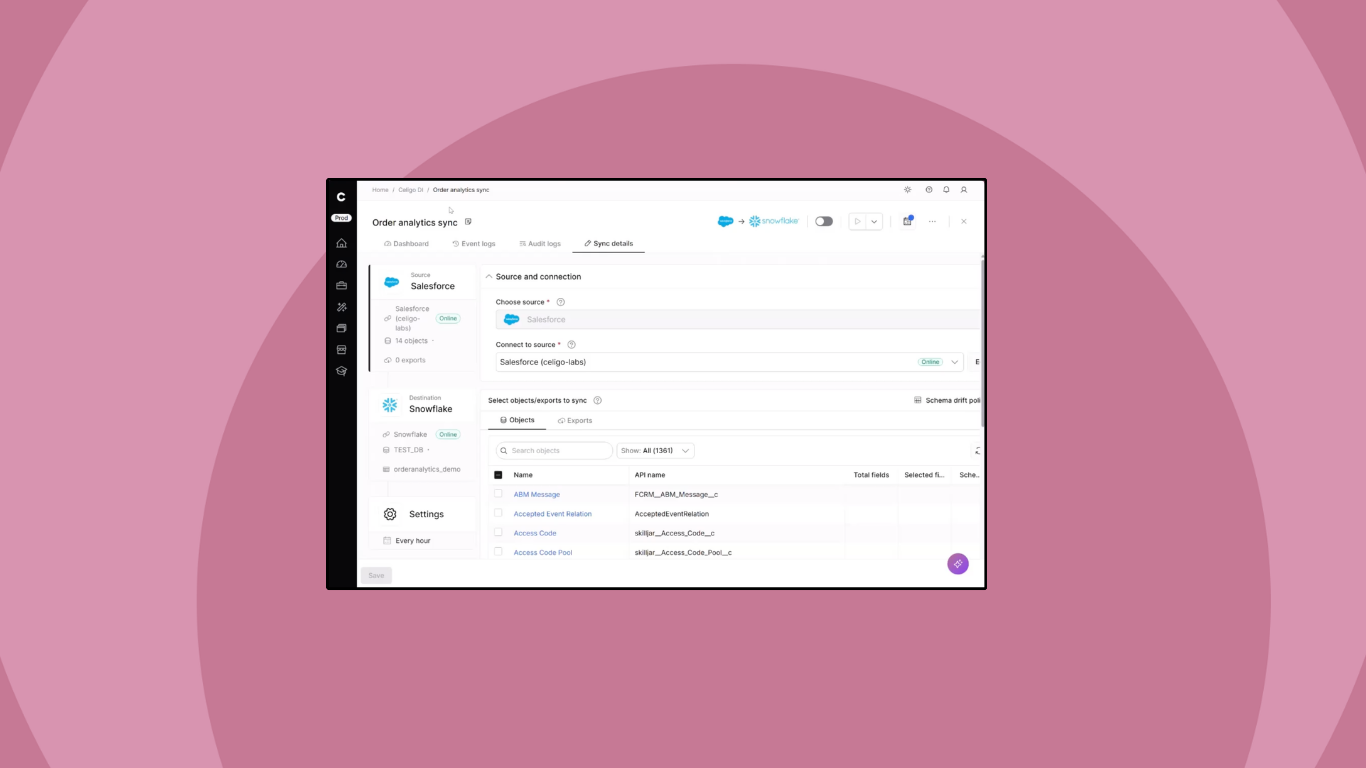
Here, we’ll set up a data sync between Salesforce and Snowflake in under two minutes.
One pipeline to replace multiple flows
Teams often use individual integration flows to move data from applications into a warehouse. That works for targeted, workflow-driven use cases, but it becomes difficult to scale when teams need to move many objects and fields.
For example, syncing Salesforce data to Snowflake may require separate flows for Accounts, Opportunities, Leads, Cases, and custom objects. Each flow is built by hand, maintained separately, and vulnerable to source changes.
Celigo Data Ingestion replaces that pattern with a single intelligent pipeline. Builders can move many objects in a single sync instead of creating and maintaining a separate flow for each object. Celigo can automatically create and maintain destination tables based on selected source objects, reducing the technical overhead required from IT and data engineering teams.
The result is faster build time, easier maintenance, and less operational drag.
Pipelines that evolve with schemas, applications, and business needs
Business applications change constantly. New fields are added. Fields are removed. Data types change. New reporting requirements emerge.
A schema change can break downstream flows and leave teams scrambling to find the root cause. In the Salesforce-to-Snowflake example above, if a Salesforce field such as Annual_Revenue is removed, replaced, or redefined as ARR, downstream flows and reports that depend on the original field may fail or return stale data.
Celigo Data Ingestion is designed for that reality. It can detect schema drift and apply configured drift policies to keep destination tables aligned with source changes. Celigo supports drift handling for changes such as new or removed objects, column add/remove, and data type changes.
That means fewer manual updates, less maintenance, and more predictable behavior as schemas, applications, and business needs evolve.
A build experience designed for speed
Instead of writing queries by hand, manually creating warehouse tables, and mapping hundreds of fields one by one, builders start with Create Sync.
From there, Celigo uses source metadata to discover what exists in the selected Salesforce connection, including available objects, fields, and data types. The builder can select the objects and fields to sync, configure ingestion behavior, choose a destination such as Snowflake, and schedule the sync.
In the Salesforce-to-Snowflake demo, selecting a Salesforce connection automatically fetches available Salesforce objects and exposes related field metadata, removing much of the guesswork from setup.
Celigo handles much of the heavy lifting that previously required custom setup and ongoing engineering maintenance.
→ Learn more about Celigo Data Ingestion
From data ingestion to data activation, all on one platform
Celigo goes beyond data ingestion by helping teams do more with data once it lands.
Ingestion is the first step in a broader data lifecycle. Data moves into the warehouse, is prepared for analytics and AI use cases, and can then be operationalized back into the applications where business teams work.
For example, a team might ingest Salesforce, NetSuite, Zendesk, and Gong data into Snowflake to identify churn risk. Once that risk is calculated, Celigo can help activate the insight by updating Salesforce, creating a Zendesk ticket, sending a Slack notification, or triggering a follow-up workflow.
This is the combination of warehouse ingestion and operational activation: data moves into the warehouse, then enriched insights move back into business systems to trigger action.
That is the difference between storing data and using data.
Built as one, not bolted on
Celigo Data Ingestion runs on the same Celigo platform that supports integration automation, APIs, EDI, monitoring, and governance.
That matters because teams do not just need another pipeline tool. They need a consistent way to move, monitor, govern, and activate data across business processes.
Celigo gives builders one platform for integration and ingestion, with shared visibility and a common operating model.
The outcome is:
- Faster access to business data
- Less maintenance when applications change
- More reliable warehouse pipelines
- A direct path from data ingestion to operational activation
With Celigo Data Ingestion, builders can replace brittle, hand-built ingestion flows with adaptive pipelines, keep warehouse data current as business systems evolve, and turn business data into action across the enterprise.
Integration insights
Expand your knowledge on all things integration and automation. Discover expert guidance, tips, and best practices with these resources.