Celigo May 2026 Release

This release introduces Celigo Ora for AI-driven error analysis and expands the AI ecosystem with Google Gemini support and Model Context Protocol (MCP) integration.
Security and platform governance are significantly strengthened through mandatory MFA and granular workspace roles, while B2B EDI capabilities now include persistent MDN logging and native NetSuite fulfillment support.
→ Read the full May release notes
AI automation
MCP prompts for AI agents
Discover and use Model Context Protocol (MCP) prompt templates without building custom, one-off integrations. You can map required inputs and arguments directly in Celigo, attach approved prompts to specific agents, and see clear attribution for the server and connection behind each capability.
This helps teams scale agent workflows faster while keeping prompt access controlled and traceable.
MCP Server OAuth with Celigo identity
You can now configure MCP servers to authenticate users with their Celigo credentials. Users connecting from tools like Claude or Cursor are directed to a standard Celigo sign-in page, and admins can manage access centrally.
This removes the need for separate identity provider setup and keeps MCP access management inside Celigo.
Celigo Ora error analysis
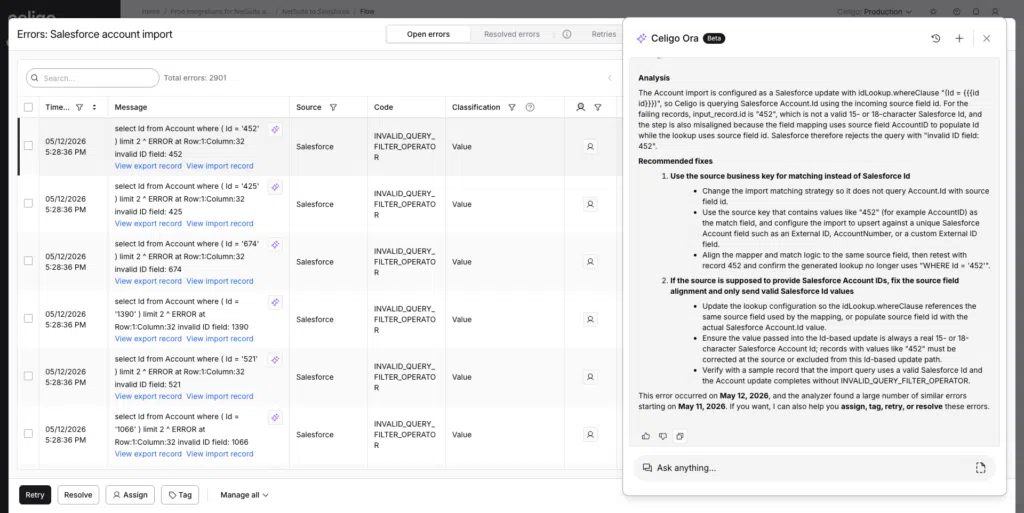
Celigo Ora now provides AI-powered error analysis directly from the errors page.
Ora analyzes the specific context of an integration error and provides plain-language explanations with recommended next steps.
This helps teams move from raw error details to guided resolution faster, without making manual log review or a support ticket the first step.
Google Gemini support for AI agents
Agent Builder now supports Google Gemini alongside OpenAI, giving teams more flexibility.
Gemini is available through both Bring-Your-Own-Key (BYOK) and Celigo AI. BYOK lets you connect using your own API credentials, while Celigo AI provides access to an embedded LLM directly through the platform.
Current model support includes:
- OpenAI: available through BYOK and Celigo AI
- Gemini: available through BYOK and Celigo AI
- Anthropic: coming soon
A new capability validation matrix helps ensure agents are configured only with compatible options, such as thinking controls, vision enablement, and structured output. Gemini is also supported in model comparisons, and Celigo guardrails now extend to Gemini-powered flows for PII detection, content moderation, and custom business policy enforcement.
This gives teams more freedom to choose the right model while keeping guardrails and deployment options consistent inside Celigo.
Conversational input and chat
Builders can now interact with Agents through a chat interface with saved conversation history.
You can resume previous work, see live tool execution progress, and attach files such as PDFs or images to refine Agent outputs.
This makes agent development more iterative, easier to test, and easier to continue over time.
Standalone import preview
You can now preview AI Agent, Guardrail, and HTTP imports without creating a flow. This helps you validate configurations earlier in the setup process and ensures data mapping is correct before final implementation.
Platform
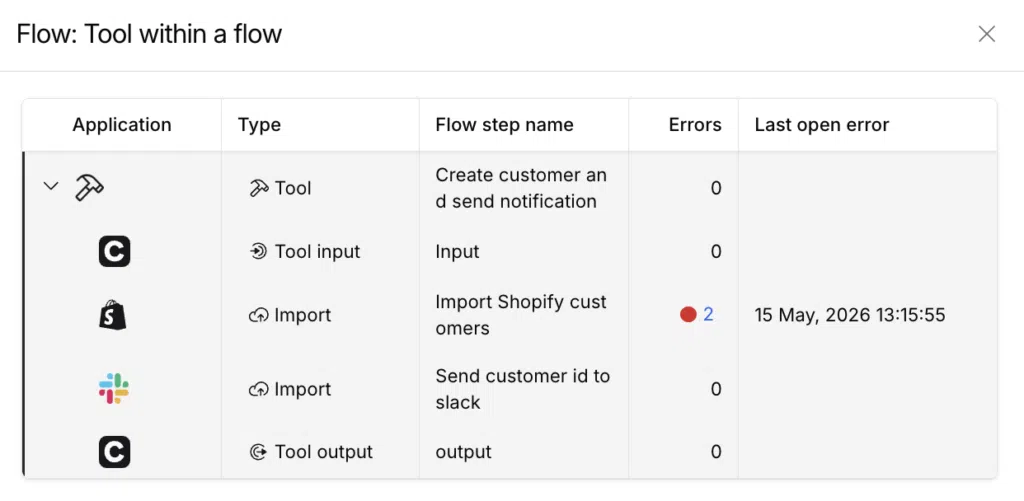
Tools in flows
You can now reuse Tool-based business logic directly within your flows as an import step. This allows you to standardize logic across the platform and reduces maintenance by eliminating the need to duplicate configurations previously limited to Agents.
Error management workspace
You can now triage and resolve errors more efficiently with a redesigned error management workspace built for faster investigation and action.
A new experience with a personalized errors table that lets you add, remove, reorder, and resize columns.
- Dedicated columns for Trace Key, Error ID, Assigned To, and Tags keep critical data structured, while improved search helps you quickly find errors by message, code, assignee, or tag.
- Perform bulk actions, including Retry, Resolve, Assign, and Tag, consistently across both Open and Resolved tabs, edit retry data inline without losing your place, and use sequential navigation to move through issues faster.
Execution logging defaults
Execution logs now default to Basic, rather than No logs, for all new Celigo accounts.
This gives teams immediate run-level and record-level visibility into flow performance without extra setup. Existing accounts will receive the default in phases, and teams can still adjust logging levels in integration settings.
MFA enforcement at sign-in
Multi-Factor Authentication (MFA) is now mandatory for all paid accounts to enhance platform security. Newly converted accounts receive a 7-day grace period, while existing users will see a streamlined setup flow during sign-in to ensure integrations and data remain protected.
Lookup cache management
You can now register and maintain lookup caches directly from an integration tile or workspace. A new Lookup Caches tab provides a central location to browse, search, and perform common actions like purging or de-registering caches without deleting the underlying data.
Integration workspace creation roles
Admins can now enable a toggle that allows “Monitor all” and “Custom” roles to create, clone, or install integrations. This provides team members more autonomy to manage resources while maintaining security boundaries for connections they do not own.
B2B Manager for EDI
NetSuite cartonization and shipping labels (coming early June)
Celigo is adding native support for generating shipping labels and managing cartonization within NetSuite integrations.
This will help NetSuite users manage more of the fulfillment workflow inside Celigo-supported EDI processes and reduce the need for separate labeling tools or custom fulfillment logic.
AS2 Message Disposition Notification (MDN) logging
Celigo now persistently stores AS2 MDNs for every transaction, so you can view acknowledgment data directly in the EDI activity dashboard without enabling debug mode.
This update automatically logs MDN details for all inbound and outbound AS2 transactions, whether synchronous or asynchronous. By making this data available via the dashboard and API, you can now efficiently resolve partner disputes and meet enterprise-grade audit requirements.
EDI acknowledgment file visibility
You can now view and download Functional Acknowledgment files directly from the EDI dashboard. This gives teams direct access to outbound acknowledgment status, reducing dependency on Support or backend logs.
EDI activity dashboard updates
Acknowledgment files can now be included directly in the EDI activity dashboard to improve visibility into outbound EDI status. This gives EDI teams clearer access to the files and status details they need for follow-up and troubleshooting.
Larger outbound EDI file generation
You can now generate outbound EDI files from source JSON payloads up to 1 GB. This supports high-volume EDI scenarios such as bulk purchase orders and invoices without manual file splitting or external infrastructure changes.
Integration Apps and templates
Marketplace AI identification
AI-powered solutions in the Marketplace are now easier to find through a new AI badge and a dedicated AI-focused section. Discover templates and Integration Apps that use intelligent automation more quickly.
Scale Shopify–NetSuite commerce operations with a GraphQL-ready automation template
Celigo’s new GraphQL-based Shopify–NetSuite template helps automate order-to-cash with more flexibility, scalability, and alignment with Shopify’s latest capabilities. It gives teams a future-ready foundation for connecting Shopify and NetSuite without sacrificing time-to-value.
→ Get the Shopify–NetSuite GraphQL template
Shopify API version 2026-04 support
Celigo now supports Shopify API version 2026-04 for long-term stability.
This update includes validated compatibility with changes from Shopify’s 2025-10, 2026-01, and 2026-04 releases, helping existing integrations continue to run smoothly.
Units of Measure support for Shopify-NetSuite flows
You can now sync quantities accurately between Shopify and NetSuite when Units of Measure is enabled in NetSuite. Fulfillment, refund, return authorization, and item receipt import hooks now read the quantityUOM value instead of the base-unit quantity.
This ensures per-unit rates are calculated correctly and helps prevent errors such as misidentified partial refunds or incorrect remaining-quantity checks during fulfillment.
Integration Marketplace
New connectors available:
- Check out the new HTTP connectors available in the Integration Marketplace.
- The EDI trading partners article provides an alphabetical listing of trading partners, search functionality, and filters.
Live event: Celigo Spring Platform Highlights
Celigo has been moving fast, and we want to make sure you have a front-row seat.
Join us on Tuesday, June 2, for the Celigo Spring Platform Highlights, where we’ll share what’s new, what’s next, and how your team can put it to work.
Here’s what we’ll cover:
- How to bring AI into real business workflows
- Build, test, and troubleshoot integrations faster
- Scale EDI and commerce operations
Get an early look at Celigo Data Ingestion, which helps teams extract application data, load it into a warehouse, and make it ready for BI reporting, analytics, and AI-powered workflows without adding another ELT tool.
Integration insights
Expand your knowledge on all things integration and automation. Discover expert guidance, tips, and best practices with these resources.