Celigo August 2025 Release
 Updated Jan 27, 2026

Celigo’s August release is live!
This release introduces updates to Flow Builder, API Builder, B2B Manager, and platform performance, focused on improving logic configuration, supporting on-premise connectivity, enhancing EDI file handling, and increasing flow execution speed at scale.
Platform
Migrated all accounts to the new Builder UI
All users are now using the new Builder UI, which provides a cleaner layout and more efficient workflow for building flows and APIs. This ensures consistency across the platform and prepares users for future enhancements. The legacy UI remains temporarily accessible until later this year.
Redesigned branching and filter rules to build complex logic
With the redesigned rule editor, you can now build, read, and manage complex logic more intuitively. Logical operators like AND, OR, and NOT are visually clear, operands are searchable, and conditions can be reordered, cloned, or cleared — no scripting required.
This experience is consistent across all filter and branching locations, making it easier to configure and maintain complex flows.
Assign export aliases to all webhook listeners
You can now assign aliases to webhook listeners, even if they don’t include a connection. This allows you to trigger listener-based exports programmatically without requiring additional setup or configuration.
Improved connection selection when installing and cloning integrations
When installing or cloning templates and integrations, the connection setup step now defaults to Use existing connection instead of Create new connection.
Integrations cloned within the same environment default to the original connections; otherwise, you can create or select any connection.
Form builder UX enhancements: search, freeform input, & select all
We’ve improved usability across several custom settings:
- Search is now supported for select, multiselect, exportSelect, and staticMap settings.
- Freeform input is supported with the new parameter allowFreeText: true available for select, exportSelect, and staticMap.
- “Select all” is now available for all multiselect-enabled settings.
These changes make it easier to work with large lists and support nonstandard inputs when needed.
Export execution mode – parallel export processing for superior flow performance
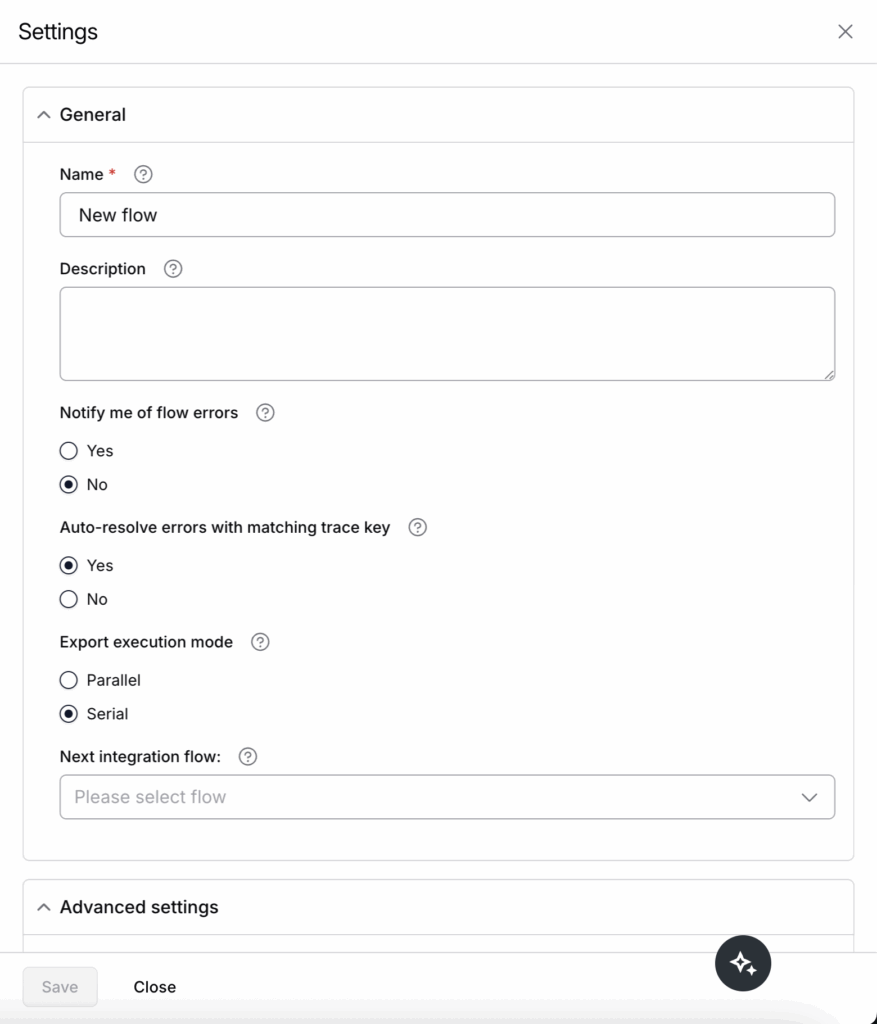
We’ve added a new export execution mode setting that allows multiple exports to run in parallel within a single flow. For flows with various input sources, parallel processing significantly improves performance, enabling faster execution and better scalability as data volume increases.
You can configure this setting per flow, choosing between sequential and parallel execution to align with your logic and throughput needs.
B2B Manager for EDI
Repositioning composite delimiter – EDIFACT
We’ve updated how composite delimiters are handled in File Definition Rules (FDRs) for version 2. Instead of requiring a composite delimiter (e.g., “:”) to be set within each individual value block, it now only needs to be defined once globally in the header, alongside other delimiters.
This improves maintainability and makes it easier to update or standardize delimiter usage across trading partners. This update has been validated for both EDIFACT and X12 formats.
Version 1 FDRs remain unchanged to ensure backward compatibility, and parsing behavior is preserved.
API Management
On-prem agent support in API Builder
You can now use on-prem agents within API Builder to securely connect to on-premise databases and applications. This allows you to build and expose APIs that interact with systems behind firewalls, without requiring public internet exposure. It enables controlled, secure access to data and services from legacy or private environments.
Connectivity
Enhance HTTP Universal Connector to support Base64 encoding for JWT token authentication
We’ve added a new option to support Base64-encoded secrets during HMAC signature generation. This enhancement enables developers to work more seamlessly with APIs that provide secret keys in Base64-encoded format—a common requirement in modern authentication flows.
Key Highlights
- New Option: “Base64-Encoded Secret”
When this option is enabled for a secret, the platform will automatically decode the Base64-encoded value before using it in the signature computation. - Supported HMAC Algorithms:
- HMAC SHA256
- HMAC SHA384
- HMAC SHA512
- Improved Compatibility with External Tools:
This behavior aligns with functionality found in tools like Postman, where users can flag a secret as Base64-encoded, and the tool handles decoding before HMAC generation.
Enhanced CSV import support for all file providers
You can now identify Custom header rows when importing CSV files to S3, FTP, and NetSuite. This option was previously available only for Google Drive, Azure Blob, Box, and Dropbox.
Support for NetSuite 2025.1 WSDL version
Celigo now supports the 2025.1 WSDL, in alignment with NetSuite’s latest update. As part of this release, all existing NetSuite connections using deprecated WSDL versions (2018.1 and 2020.2) will be automatically updated to 2025.1 to maintain compatibility.
Integration Marketplace
Check out the new TP and HTTP connectors available in the Integration Marketplace.
Integration insights
Expand your knowledge on all things integration and automation. Discover expert guidance, tips, and best practices with these resources.