What is CRM automation? A 2026 guide to cross-system workflows


CRM workflow automation has been around for years. Manual processes in marketing, sales, and customer service operations drain time, introduce errors, and slow down the sales process. At enterprise scale, investing in CRM automation is essential.
Most articles still define CRM automation as rules and triggers inside Salesforce or HubSpot. That definition is outdated.
Modern CRM automation includes sales automations, marketing automations, lead management logic, and AI-driven automated workflows that span the entire sales pipeline and customer lifecycle. It connects customer relationship management systems with ERP, billing, ecommerce, support, and data platforms.
This guide is written for IT, operations, and revenue leaders at mid-market and enterprise organizations. These are teams that need CRM automation to scale across systems, not just run faster inside a single platform.
For these IT and operations leaders, CRM automation is about building automated workflows that scale across systems, support governance, and create a foundation for AI that improves the entire sales process.
This guide breaks down what CRM automation means in 2026, how AI is reshaping sales automation and marketing automation, and how to design automation tools that scale across your pipeline.
What is CRM automation?
The bigger a business gets, the harder it becomes to manage customer relationships manually. Teams that try encounter human errors and inefficiencies.
CRM automation is the use of software to automate and orchestrate customer-related workflows in and around the CRM—across sales, marketing, service, and back-office systems—so data stays aligned and processes run consistently.
It includes:
- Sales automations that move opportunities through the sales pipeline
- Marketing automations that nurture and score leads
- Lead management processes that align marketing teams and the sales team
- Automated workflows that connect CRM to ERP, billing, and support
CRM automation can be broken into two layers:
1. Native CRM automation
Platforms like Salesforce and HubSpot provide built-in automation tools such as:
- Workflow rules
- Triggers
- Task assignments
- Email sequences
- Basic lead scoring
- Sales pipeline stage updates
- AI chatbots and conversational automation tools that handle routine inquiries, qualify leads, and route cases without human intervention
These tools help marketing and sales reps manage day-to-day tasks (assigning leads, triggering follow-up emails, updating opportunities stages, etc.) and keep the sales pipeline moving.
These automations improve efficiency inside the CRM. But they do not solve cross-system orchestration.
2. Cross-system automation and orchestration
Modern CRM automation connects customer relationship management platforms like Salesforce and HubSpot to ERP, marketing automation systems, ecommerce platforms, billing systems, and support tools.
This orchestration view accepts that workflows are interconnected: deals affect finance, product usage affects renewals, marketing teams rely on lead scoring and behavioral data, sales reps depend on accurate pipeline data, and AI models require unified data across systems.
Automation workflows in a silo can only go so far. Integration and automation tools like Celigo orchestrate automated workflows that span:
- Sales process to order fulfillment
- Lead management to revenue recognition
- Marketing automations to subscription billing
- Customer support to renewal forecasting
In 2026, CRM automation is about orchestrating the entire pipeline.
Why CRM automation matters more than ever in the age of AI
The average company now runs dozens of automation tools across sales, marketing, finance, and operations.
AI is also transforming CRM automation and workflows. Celigo’s recent research with MIT Technology Review found that 93% are piloting AI in one or more departments.
Earlier sales automations focused on task assignment and reminders. Today, AI enhances:
- Predictive lead scoring
- Sales pipeline forecasting
- Automated pipeline risk alerts
- Intelligent sales process recommendations
- AI-assisted follow-ups for sales reps
AI-driven CRM automation can:
- Recommend next best actions for a sales rep
- Identify stalled pipeline opportunities
- Trigger marketing automations when usage drops
- Automatically adjust lead scoring models
- Detect anomalies in the sales pipeline
But AI only works when automated workflows connect systems end to end.
If ERP data is not aligned with Salesforce, or if billing status is not synced to HubSpot, AI models lack context. AI depends on integrated, governed automation tools that keep the pipeline accurate.
CRM automation is the foundation that AI builds on. So when systems are disconnected:
- Sales reps need to re-enter data manually
- The sales pipeline reflects outdated information
- Lead scoring becomes unreliable
- Marketing automations trigger on incomplete data
- AI produces flawed insights
If CRM automation is disconnected to the rest of the enterprise tech stack, AI and automation tools will amplify inconsistencies across your pipeline.
Modern CRM automation closes those gaps and strengthens both sales automation and marketing automation strategies.
Core CRM workflows and functions to automate
The highest-impact CRM automation isn’t just “if field X changes, send an email.” It spans multiple systems by connecting your CRM to marketing platforms, ERP, billing, support tools, and more.
Below are some core CRM workflows and functions to automate.
Lead capture, lead scoring, and lead management
- Capture leads from web forms, ad platforms, and marketing tools, then sync them automatically into Salesforce or HubSpot
- Apply AI-driven lead scoring across CRM and marketing automation data to prioritize outreach
- Route high-value leads to the right sales rep based on territory, industry, or deal size without manual triage
- Update the sales pipeline automatically so marketing and sales are always working from the same record
Strong lead management ensures marketing teams and the sales team operate from the same data.
Sales pipeline and sales process automation
- Automatically advance pipeline stages in your CRM based on activity logged in email, calendar, and calling tools
- Trigger sales automations such as follow-up tasks, rep alerts, or sequence enrollment when deals stall across any connected platform
- Notify sales reps when AI detects pipeline risk by analyzing signals from CRM, support, and engagement tools together
- Sync finalized quote data from CPQ tools to ERP so pricing stays consistent end-to-end
Sales to finance handoff
When a deal closes in Salesforce:
- Create orders automatically in your ERP, eliminating manual re-entry between systems
- Trigger billing workflows in your finance platform the moment opportunity stage changes
- Update customer records across CRM, ERP, and any customer success tools simultaneously
- Sync invoice and payment status back to CRM so the pipeline reflects real revenue, not just projected revenue
For example, many teams integrating Salesforce with SAP use automation to create orders in SAP the moment an opportunity closes in Salesforce, eliminating manual re-entry and reconciliation. From there, sync payment status back to CRM.
Post-sale handoff and onboarding
When a deal closes, automation should hand the customer off without anything falling through the cracks:
- Create onboarding tasks in your project management tool and assign them to the right customer success rep, triggered by a closed-won update in your CRM
- Provision accounts or licenses in your product automatically, without waiting for manual ops work
- Enroll new customers in onboarding email sequences from your marketing platform based on product tier or deal type
- Sync customer health data back to CRM as onboarding progresses, so sales and success teams share a single view
Marketing automations tied to revenue events
- Trigger campaigns in your marketing platform when a customer upgrades, pulled from a closed-won signal in your CRM
- Adjust lead scoring dynamically based on purchase behavior synced from your commerce or billing system
- Pause marketing automations when accounts churn, using data from support or customer success tools to update CRM segments in real time
Support signal sync
- Pull ticket volume and severity from your support platform and surface it directly inside CRM account records
- Flag at-risk accounts in the pipeline when support data such as escalations, CSAT drops, or unresolved tickets crosses a threshold
- Notify the sales team of upsell opportunities when support interactions reveal unmet needs or expansion interest
Each of these workflows require cross-system orchestration. To unlock CRM automation’s full potential, integrate your CRM across your entire tech stack.
Key benefits of an automated CRM system
Faster lead response times
Speed matters in sales. When a lead comes in, automated workflows can instantly score them, route them to the right rep, and trigger a personalized outreach sequence. By connecting your lead capture tools, CRM, and marketing platform, automation eliminates the delays that cause high-intent prospects to go cold.
Cleaner, more reliable data
Manual data entry creates duplicates, outdated records, and fields that never get filled in. CRM automation enforces consistency by syncing data across systems automatically, so when a contact updates in your marketing platform, your CRM reflects it too. Cleaner data means more accurate reporting, better lead scoring, and a better foundation and context for AI models.
Reduced manual work for sales and operations teams
Sales reps shouldn’t be copying data between systems or manually advancing pipeline stages. Automation handles the repetitive updates—logging activity, syncing records to ERP, triggering handoff tasks—so your team spends time on work that requires human judgment. For ops teams, fewer manual touchpoints means fewer errors and less time spent on reconciliation.
Better customer experience
Customers notice when handoffs go wrong. When onboarding is slow, when support context doesn’t reach the sales team, or when they receive an irrelevant marketing email the day after they churned, it erodes trust. Automated workflows keep customer data synchronized across CRM, support, and success tools, so every team has the context they need to deliver a consistent experience at every stage.
Scalable operations
Manual processes break under volume. Automation lets your CRM workflows scale with your pipeline, handling more leads without adding headcount. As your systems grow, a well-automated CRM becomes the connective tissue between every revenue-facing team.
A stronger foundation for AI
AI-driven forecasting, lead scoring, and segmentation are only as good as the data they run on. CRM automation keeps that data clean, current, and consistent across systems. This gives AI the reliable inputs it needs to generate accurate predictions and surface actionable insights across the full customer lifecycle.
Challenges and limitations of CRM automation
CRM automation can deliver real results when it’s built on a solid integration foundation. Most implementation challenges occur when systems don’t talk to each other, data doesn’t stay in sync, and workflows built inside one tool don’t account for what happens downstream.
Common pitfalls include:
- Poor data quality: When your CRM, ERP, and marketing platform each maintain their own version of a customer record, small discrepancies compound quickly. Automating on top of bad data spreads errors fast. Teams that haven’t established proper ERP and CRM integration often find that customer, order, and financial records drift apart over time, undermining reporting and AI-driven features that depend on clean inputs.
- Siloed tools with no integration: When teams automate within a single application without connecting it to the broader stack, they create a fragmented customer view. Sales, support, and finance need to see the same customer details. Otherwise, they risk delivering conflicting reports, missed handoffs, and customer-facing inconsistencies that erode trust.
- Over-automation in one system: Automations built entirely inside a CRM often ignore downstream impact in ERP, billing, or support tools. A workflow that looks clean inside Salesforce may create duplicate records in your ERP, trigger billing errors, or bypass steps that other teams depend on. Cross-system visibility is essential before automating at scale.
- Rigid, hard-coded workflows: When automation logic lives inside a single application, it becomes brittle. Every system update, process change, or new tool integration requires rewriting rules in multiple places. Teams end up managing the same logic across several systems with no central place to govern, audit, or update it.
An intelligent automation platform like Celigo addresses these challenges directly. It centralizes workflow logic, governance, and monitoring, and uses AI-based exception management to resolve the majority of routine errors automatically, so issues do not silently spread across systems.
CRM automation examples across departments
CRM automation examples can differ across departments. But the highest-impact examples all connect CRM workflows to the other systems that department depends on.
Sales
Sales automation goes well beyond assigning tasks or advancing pipeline stages. When CRM is connected to billing, product, and ERP systems, sales reps get a complete picture of every account without leaving their workspace.
- Renewal and upsell triggers: Sync product usage data and billing status into CRM automatically. When usage drops below a threshold or a contract approaches its renewal date, trigger a task for the assigned rep and enroll the account in a targeted outreach sequence, all without manual intervention.
- Pipeline-to-ERP handoff: When an opportunity closes, automatically create the corresponding order in your ERP, assign fulfillment tasks, and update the customer record across systems. Sales reps close the deal; the downstream workflow handles the rest.
- AI-driven lead prioritization: Pull engagement data from your marketing platform and product usage signals from your analytics stack into CRM lead scoring models, so reps focus on the accounts most likely to convert or expand.
Marketing
Marketing automation is most effective when campaign logic is driven by real customer behavior, not just CRM fields. Connecting CRM to marketing platforms, ecommerce systems, and product usage data allows teams to trigger the right message at the right moment.
- Behavior-based campaigns: Use purchase history from your ecommerce platform, product usage signals, and CRM lifecycle stage together to trigger personalized campaigns. A customer who upgrades their plan gets a different onboarding sequence than one who hasn’t logged in for 30 days.
- Lead scoring across systems: Enrich CRM lead scores with data from your marketing automation platform, ad channels, and website analytics. When a lead crosses a score threshold, route them to sales automatically and pause marketing sequences so they don’t receive conflicting outreach.
- Churn prevention workflows: When support ticket volume spikes or billing data signals a lapsed payment, automatically update CRM segmentation and trigger a re-engagement campaign before the account churns.
Support
Support teams are most effective when they have full account context at the moment a case comes in. Connecting your support platform to CRM, ERP, and billing systems ensures agents aren’t hunting across tools to understand who they’re talking to.
- Entitlement and account health routing: Pull contract tier, entitlements, and billing status from ERP and surface them directly in your support platform. Route and prioritize cases automatically based on account value or SLA requirements, without agents manually checking CRM or finance systems.
- At-risk account flagging: When ticket volume, CSAT scores, or escalation rates cross a defined threshold, automatically flag the account as at-risk in CRM and notify the assigned customer success rep. Sales and support stay aligned without manual coordination.
- Post-resolution upsell signals: When a support interaction reveals an unmet need or a resolved issue points to a product gap, automatically create a follow-up task in CRM for the account owner to review expansion opportunities.
Finance and operations
Finance and ops teams sit at the end of most revenue workflows , but they’re often the last to get automated. Connecting CRM to ERP, billing, and provisioning systems eliminates the manual handoffs that slow down order processing, invoicing, and reconciliation.
- Order creation on close: When an opportunity reaches closed-won in CRM, automatically create the order in your ERP, trigger the billing workflow, and provision any licenses or services in your product system.
- Invoice and payment sync: Sync invoice status and payment confirmations from your finance system back into CRM, so the pipeline reflects actual revenue rather than projected revenue. Sales leaders get accurate forecasts; finance gets fewer reconciliation requests.
- Contract and renewal management: When a contract record updates in CRM, automatically trigger corresponding updates in your ERP and notify the finance team of upcoming renewals, amendments, or cancellations that affect revenue recognition.
CRM automation tools to consider
No single tool handles every CRM automation need. Most teams operate a combination of platforms. The quality of their automation depends on how well those platforms are connected.
CRM platforms with native automation
Salesforce and HubSpot are the foundation of most CRM automation stacks. Both offer built-in workflow tools for pipeline management, lead routing, task assignment, sales sequences, and basic field-update logic. For automations that live entirely within the CRM — advancing a deal stage, enrolling a contact in a sequence, or notifying a rep when a lead scores above a threshold — native automation is often sufficient.
The limitation is scope. Native CRM automation is designed to work within the platform. When workflows need to reach ERP, billing, support, or marketing systems, in-app automation tools hit their ceiling quickly.
Marketing and sales engagement tools
Platforms like Marketo, Pardot, Outreach, and Salesloft extend automation into campaign orchestration, behavioral triggers, multi-channel sequences, and AI-enhanced segmentation. These tools are purpose-built for engaging prospects and customers at scale.
But their effectiveness depends on accurate, up-to-date CRM data. When contact records, lifecycle stages, and account data aren’t synced reliably between your CRM and engagement platforms, campaigns fire at the wrong time, leads get double-enrolled, and scoring models work from stale inputs.
Integration and automation platforms (iPaaS)
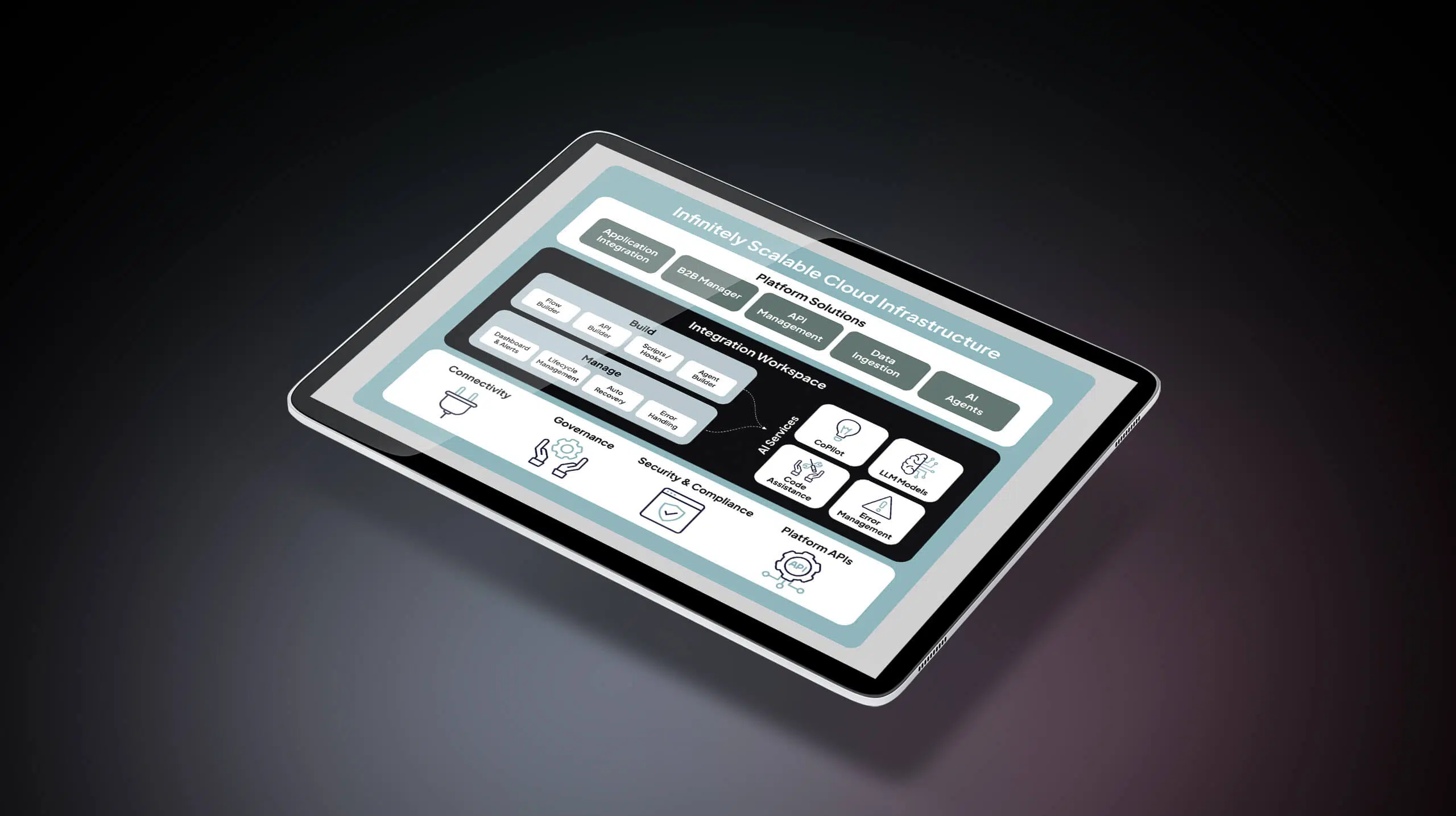
Integration platforms are built for cross-system orchestration. Where native CRM tools automate within a single platform, iPaaS solutions connect CRM to ERP, marketing, support, billing, ecommerce, and data platforms. They manage the logic, governance, and error handling that makes those connections reliable at scale.
Celigo is built for this governed orchestration layer. Rather than replacing Salesforce or HubSpot, it sits alongside them — orchestrating CRM-centric workflows across the stack, keeping CRM, ERP, and support data aligned, and providing central monitoring and error handling so teams aren’t managing automation logic separately in every connected system.
When a deal closes, Celigo can trigger order creation in SAP, update billing in NetSuite, provision accounts in your product, and sync status back to CRM — all from a single, governed workflow.
How to choose the right combination
Most teams need all three layers working together. The right evaluation criteria depends on where your current gaps are:
- Integration depth: Can the platform connect to the specific systems in your stack: ERP, billing, support, ecommerce?
- Governance and observability: Can you monitor workflow runs, catch errors in real time, and audit data movement across systems from a central location?
- Low-code capabilities: Can non-technical teams build and modify workflows without IT support for every change?
- Scalability: Will the platform handle increased transaction volume, additional systems, and more complex logic as your operations grow?
- Reusability: Can automation logic be built once and applied across multiple workflows and systems, rather than rebuilt from scratch each time?
The teams that get the most from CRM automation are typically those that use their CRM platform for engagement, their sales and marketing tools for outreach, and an integration-first platform to keep everything connected, consistent, and observable.
Best practices for building scalable CRM automation
Start with clean, unified data.
Automation amplifies whatever data quality you already have — good or bad. Before building workflows, establish how customer, contact, and account data will be standardized and synced across your CRM, ERP, marketing, and support systems. Inconsistent field mapping and duplicate records will undermine even well-designed automations.
Map cross-functional workflows before automating.
Trace the full path of a lead, deal, or customer request before writing automation rules. Identify every system it touches, every team that hands it off, and every place where data needs to move between platforms. Automating a poorly understood process just compounds the issue.
Design automation as cross-system workflows, not just in-app rules.
The highest-impact CRM automations don’t stop at the CRM boundary. When a deal closes, the workflow should reach ERP, billing, provisioning, and customer success tools — not just update a field in Salesforce. Build with the full system context in mind from the start.
Avoid embedding critical business logic solely inside your CRM.
Logic buried in Salesforce flows or HubSpot workflows is hard to reuse, audit, and update when processes change. If a rule matters to multiple systems or teams, it belongs in a layer that can govern it centrally, not locked inside a single application.
Use low-code tools to keep IT from becoming a bottleneck.
Automation shouldn’t require an engineering ticket for every update. Choose platforms that let business, revenue operations, and marketing teams build and modify workflows without developer support, while giving IT the governance and control it needs.
Build for change.
Processes shift, systems get replaced, and business rules evolve. Automation logic should be modular and easy to update, not hard-coded in ways that require rebuilding workflows from scratch every time something changes. Favor platforms that support iteration over ones that require rigid configuration upfront.
Monitor workflows continuously with alerts and error handling.
Build in error alerting, logging, and retry logic from the start, and establish a regular cadence for reviewing workflow health.
Centralize integration and automation logic on a governed platform.
Managing automation rules separately in every connected system creates inconsistency, redundancy, and blind spots. A platform like Celigo gives teams a single place to build, monitor, and govern cross-system workflows — so logic is reusable, errors are visible, and changes don’t require updates in every application simultaneously.
CRM automation that scales isn’t built inside a single tool. It’s designed across systems, governed centrally, and built to adapt as your stack and your business evolve.
Celigo: The backbone of scalable CRM automation
Celigo provides the integration-first foundation that connects CRM to the rest of the stack — orchestrating workflows across Salesforce, HubSpot, ERP, marketing automation, billing, support, and data platforms from a single, governed layer.
Integration-first foundation
Celigo connects CRM with the systems revenue teams actually depend on — ERP, marketing automation platforms, support tools, billing systems, and data warehouses. Rather than managing point-to-point connections between each application, teams use Celigo to build and maintain cross-system workflows in one place. Customer records, pipeline data, order status, and account health stay synchronized in real time across every connected platform — so every team works from the same version of the truth.
Event-driven, exception-aware workflows
Celigo triggers CRM-centric workflows on the business events that matter: a new lead captured, a deal closed, an invoice paid, a support ticket escalated. When those events fire, Celigo orchestrates the downstream actions across systems — creating orders in ERP, enrolling customers in onboarding sequences, provisioning accounts, syncing payment status back to CRM — without manual intervention.
Built-in AI-based exception management helps resolve routine errors automatically, and routes only the edge cases for review, so automation keeps running without constant babysitting. When a sync breaks or a record doesn’t match, Celigo surfaces the issue, logs it, and routes it for resolution, so bad data doesn’t compound across systems before anyone notices.
Governance and observability
When automation logic is scattered across CRM, ERP, and marketing platforms, no one has a complete picture of what’s running, what’s changed, or what’s broken. Celigo gives IT and operations teams unified visibility across every workflow — who changed a rule, where a process failed, which records were affected, and what was done to resolve it.
That observability isn’t just an IT concern. When pipeline data, lead scoring logic, and financial records are governed centrally, sales, marketing, and finance leaders can trust the numbers they’re making decisions from.
Low-code empowerment
Celigo’s low-code builder lets operations and revenue teams build, adjust, and iterate on cross-system workflows without starting from scratch in each application or filing an engineering ticket for every change. IT retains control over governance, permissions, and architecture — while ops teams move at the speed the business requires. When a process changes, the workflow changes with it. No rewrites. No rebuilds.
Celigo helps organizations move beyond in-app automation rules and build a scalable, observable, integration-first foundation for every CRM workflow that touches multiple systems.
Learn how Celigo powers CRM automation that scales across systems, reducing manual work, improving data quality, and keeping sales, marketing, and finance aligned.