Multi-instance flows: Scale ecommerce integrations across multiple storefronts
 Updated Feb 13, 2026

Managing storefront integrations across multiple ecommerce channels shouldn’t mean cloning and tweaking the same flow hundreds of times. When you’re operating across dozens or even hundreds of storefronts — by brand, region, or customer — small changes to integration logic can quickly become a maintenance bottleneck from repetitive rework.
Multi-instance flows provide a scalable way to manage shared integration patterns. They let you define the logic once in a master flow, then deploy it across many storefronts, environments, or tenants with lightweight, instance-specific overrides.
This reduces duplication, simplifies updates, and keeps your flow management centralized and consistent as you scale across clients, brands, or systems.
Integration flows often follow the same structure, with only minor variations, such as connection IDs or field mappings. Multi-instance flows allow each instance to inherit the master logic while overriding only what’s different.
Whether you’re preparing for a high-volume sales event or supporting long-term multi-brand operations, multi-instance flows help you scale storefront integrations efficiently, without duplicating effort.
Video demo
This video walkthrough shows how to:
- Create a multi-instance flow
- Define shared logic in a master
- Apply JSON-based overrides for connection or config
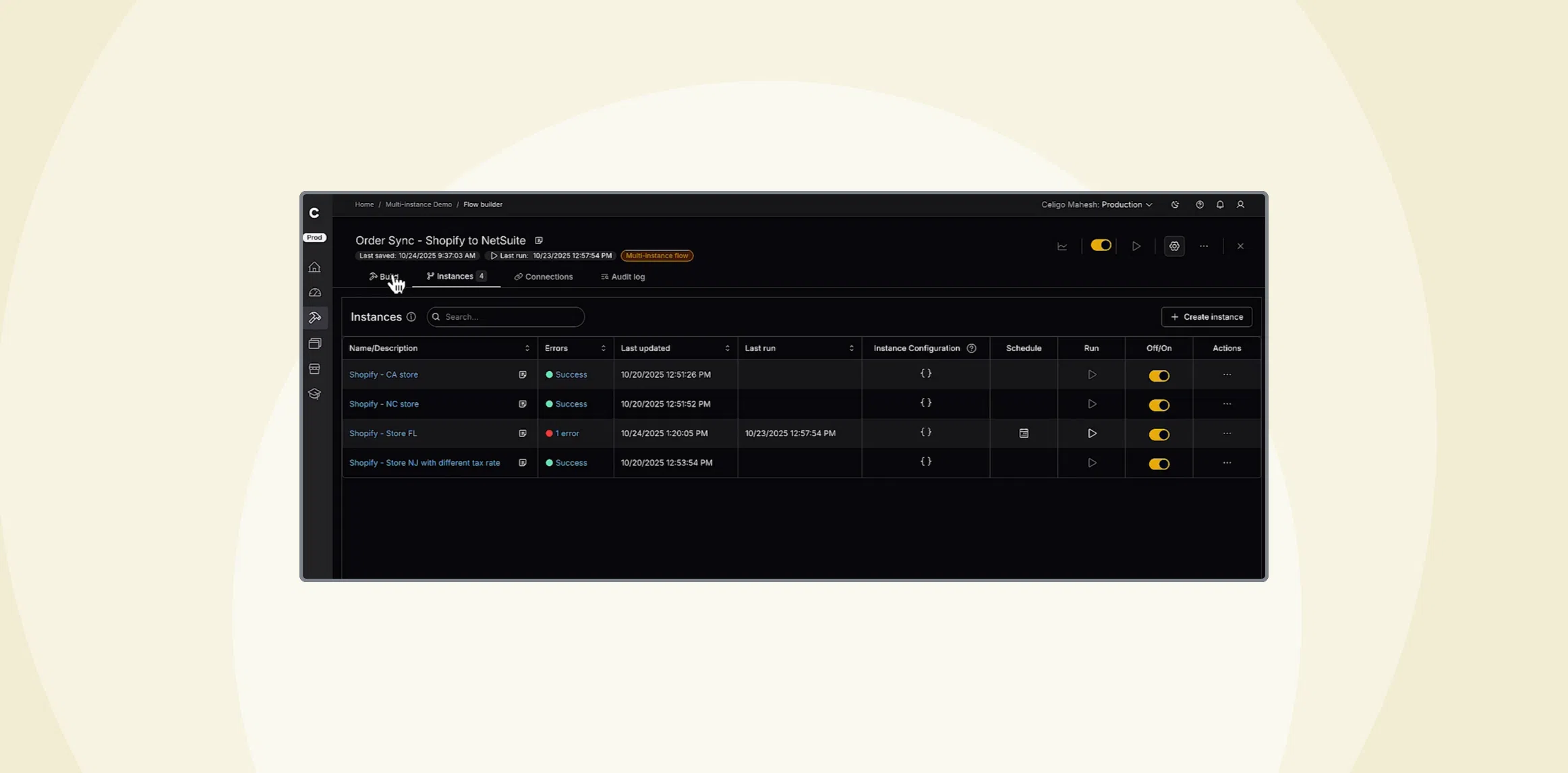
- Monitor and manage instances from a unified interface
- Convert an existing single-instance flow into a multi-instance setup
Use case: Order flows for multiple Shopify storefronts
If you’re managing fulfillment for dozens (or even hundreds) of Shopify storefronts, chances are the integration logic is the same across all of them. Orders come in through different storefronts but flow to the same backend systems, such as NetSuite or a WMS.
The only variation is usually the Shopify account; each storefront connects through a different one. With multi-instance flows, you define that shared logic once in a master flow, then create individual instances that override only what’s different — like the Shopify connection ID.
When changes are needed, such as adding a new field to the order schema, you update the master flow. All instances inherit the change automatically, without having to edit each one individually.
How multi-instance flows work
A multi-instance flow supports multiple runtime variations, or instances, while maintaining a single source of logic.
Each instance inherits all structure and behavior from the master flow and only modifies what’s different using a JSON override.
Overrides typically include:
- Connection IDs (for example, Shopify or NetSuite)
- Field mappings
- Optional field values or config settings
Each instance runs independently and is visible in a central tab for easier deployment and monitoring.
When to use multi-instance flows
Use this approach when you need to:
- Deploy the same logic across many customers, tenants, or storefronts
- Maintain consistency across staging, QA, and production environments
- Isolate account-specific overrides while centralizing shared logic
Multi-instance flows are designed for scale. Whether you’re supporting multiple Shopify storefronts, managing environments across brands, or preparing for seasonal traffic spikes, this approach lets you centralize what stays the same and isolate what’s different — all without duplicating flows.
It’s a flexible, efficient way to keep your integrations manageable as volume grows.
Coming soon!
An intuitive user experience to create instances quickly by defining a set of default properties from the master flow.
Integration insights
Expand your knowledge on all things integration and automation. Discover expert guidance, tips, and best practices with these resources.