Salesforce
 MS Dynamics 365
 Oracle NetSuite
 SAP
SAP Walmart
 Amazon
 Shopify
 Snowflake
 Acumatica
Moving existing sandboxes into the multi-environment architecture


March 2026 introduces a guided approach for customers with an existing Sandbox to migrate from today’s “Production + Sandbox” setup to Celigo’s multi-environment architecture, so you can bring your current flows, connections, and configurations forward without rebuilding—and without taking Production offline.
If you’ve been stretching one sandbox to cover development, QA, and experiments, this release removes a lot of the trade-offs. You get safer separation of work, clearer deployment practices, and a migration experience designed to reduce risk and set expectations up front.
Here’s a quick demo:
What’s new
1) A real dev/test/prod model (with a managed Sandbox)
Instead of relying on a single Sandbox for everything, your existing Sandbox becomes a managed environment alongside Production and any additional environments you choose to add over time.
That separation helps you:
-
Keep testing and experimentation out of Production
-
Reduce the chance that incomplete changes leak into live workflows
-
Build cleaner, repeatable release practices over time
2) A guided migration workflow designed to keep Production safe
Moving existing sandbox assets is often risky when it requires manual exports, imports, and rewiring. This release replaces that with a guided in-product workflow that provides clear inputs before you begin and clear follow-through steps after.
The guided experience includes:
-
A pre-migration assessment report that lists what’s involved (for example, agents, API tokens, stacks, iClients, on-prem agents) and flags where updates may be needed after migration
-
Clear system behavior during the process: Production stays online, while Sandbox is temporarily unavailable to prevent changes while resources are moved
-
A guided post-migration experience inside the new non-production environment to help you validate and complete follow-up configuration, and decide when to enable flows
How it works
If you have an existing Sandbox:
-
The feature is designed specifically for accounts already using a legacy Sandbox.
-
The account owner or Production admins start migration from the multi-environment settings.
-
The migration wizard:
-
Identifies the legacy Sandbox
-
Generates an assessment report with resources from Production and Sandbox
-
Creates a new non-production Sandbox environment and moves integrations and related assets into it
-
During migration:
-
Sandbox access is disabled so users can’t modify it while resources are being moved
-
A “Migration in progress” banner is shown, and users can continue working in Production
After migration:
-
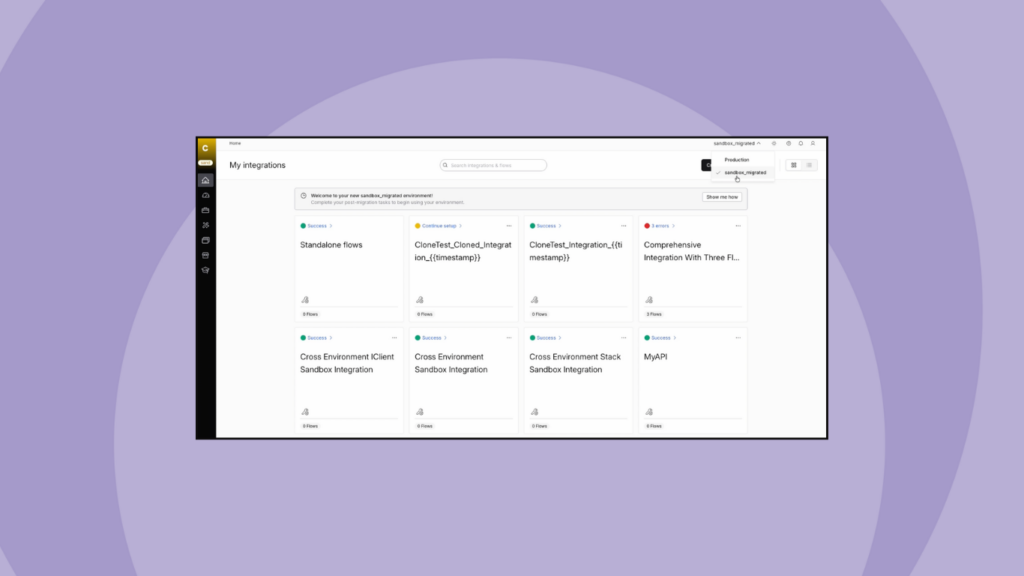
You’ll see a new non-production environment in the environment selector (for example,
SandboxMigrated) -
All integrations, flows, connections, and configurations from the legacy Sandbox are preserved in the new environment
-
You can complete post-migration activities using the assessment report and guided steps, then either:
-
Enable all flows at once, or
-
Keep them disabled and enable them flow-by-flow as you test
-
Also in this release
Beyond what’s shown in the demo, this release also introduces:
Simplified Integration App licensing
As part of the move to the multi-environment model, Integration App licensing is simplified into a global Integration App license at the account level. That means you can:
-
Use one global Integration App license to cover multiple instances of the same app across Production and non-production environments
-
Stop managing separate IA licenses tied to a specific Production/Sandbox pair
-
Scale Integration Apps across environments more easily as you add new non-production environments
Auto-conversion for accounts without Sandbox
If your account doesn’t have a Sandbox today, it’s automatically converted to the multi-environment setup in the backend:
-
No banner, no guided steps, and no action required
-
Your current Production experience remains the same, and you’re ready to add environments when you need them
What to plan for
If you use Sandbox today, plan for:
-
A short window where Sandbox is unavailable while migration runs (Production remains online)
-
Time to review the assessment report, complete any follow-up updates for duplicated/shared resources, and re-run key flows to confirm expected behavior
As migration becomes available for your account, you’ll see prompts in-product and receive email guidance to help you choose the right time to move.
Once you’re on the new architecture, you’ll be better positioned to scale integrations and enforce cleaner release practices, with clearer environment separation and less manual overhead.
Integration insights
Expand your knowledge on all things integration and automation. Discover expert guidance, tips, and best practices with these resources.