Best Mulesoft alternatives for 2026
 Updated Dec 9, 2025


MuleSoft has long been a go-to for enterprise integration and API management. But as IT leaders modernize their stacks, many are rethinking that choice. Its complexity, long deployment cycles, and high costs are increasingly at odds with today’s need for speed and scalability.
Whether you’re an enterprise or a fast-growing company looking for agility, there are strong alternatives that deliver robust capabilities—without the heavy lift or high price tag.
Best MuleSoft alternatives shortlist
Here’s our pick of the best MuleSoft alternatives in 2026:
- Celigo — Best overall MuleSoft alternative for scalability and TCO
- Boomi — Good for large enterprises needing hybrid integrations
- Workato — Good for task automation-focused teams
- Jitterbit — Good for API use cases
- Apigee (Google Cloud) — Good for API management
- SnapLogic — Good for ELT/ETL and application integrations
- Informatica — Good for data management and enterprise data governance
- Zapier — Good for lightweight and no-code automation
- n8n – Good for developer-led, open-source workflow automation
- Tray – Good for scalable low-code automation across business teams
Introduction
MuleSoft has long been recognized for powering enterprise-grade integration connecting complex systems through an API-led approach that delivers governance, control, and reliability. It’s a strong fit for large, IT-driven organizations with established integration teams.
However, as organizations modernize their tech stacks, many are re-evaluating whether MuleSoft remains the best choice. Since becoming part of Salesforce, MuleSoft’s roadmap has increasingly aligned with Salesforce-centric use cases. Adding to this, its recent drop from a “Leader” position in a leading industry assessment signals growing concerns about product direction and innovation pace.
Whether you’re already using MuleSoft or evaluating it for your organization, this analysis will help you make a confident, informed decision.
Why consider MuleSoft alternatives
As integration requirements become more critical for growth, businesses are prioritizing ease of use, faster deployment cycles, and lower total cost of ownership (TCO), areas where legacy, developer-heavy platforms often fall short.
Below are the key reasons organizations evaluate alternatives to MuleSoft:
- Complex setup: Unless you have a large, trained IT team fluent in its proprietary tools, go-live can take much longer (or can even fail altogether).
A customer who recently switched from MuleSoft to Celigo said, “One integration that was supposed to take four months—took a year and a half with MuleSoft” – a concern we hear from MuleSoft users. - Scalability needs: While MuleSoft supports enterprise-scale workloads, expanding with MuleSoft means starting from scratch each time. Adding or modifying integrations remains a resource-intensive and time-consuming process. For organizations needing faster time-to-value or rapid digital transformation, this delay can be a significant drawback.
- High maintenance: Multi-layered architecture, regular connection updates, manual exception handling, version upgrades, infrastructure setup together involves significant and constant monitoring, turning routine tasks into months-long projects. For modern IT teams, it’s overkill.
- Support issues: Teams often spend hours digging through “millions of lines of logs” to troubleshoot problems. Moreover, slow support response times and limited assistance in resolving technical issues leave them stranded, reinforcing the need for internal MuleSoft resources.
- Cost considerations: MuleSoft’s complex model, based on vCores, flows, and message consumption, often leads to surprise overages. One customer noted they exhausted their entire annual MuleSoft budget in just three months during implementation, forcing them to pause the project entirely.
Bottom line: Organizations considering MuleSoft should be prepared to allocate dedicated resources across IT, DevOps, and infrastructure, often involving multiple team members. Additional budget may be needed for training, staffing, and managing potential overages. If these requirements are a constraint, this guide offers alternative solutions that may better align with your operational capacity and goals.
10 platforms better than MuleSoft
| Platform | Best For | Best Use Cases | Key Differentiator |
|---|---|---|---|
| Celigo | Fast-growing mid-market and enterprise organizations that need scalable integration and automation without heavy custom development | ERP–CRM syncs, Order-to-Cash, Quote-to-Cash, Procure-to-Pay, EDI, ITSM, API management, ecommerce fulfillment, HR-to-IT workflows, and other cross-functional automation use cases | AI assisted workflows, enables IT and Non IT, automatically resolves 95% of errors at scale, unified platform (App Integration, APIM, EDI) |
| Boomi | Large enterprises with hybrid environments | Hybrid cloud/on-prem integration, MDM, API and EDI connectivity | Mature enterprise suite with hybrid deployment |
| Workato | Business and IT users focused on task automation | Sales, marketing, HR, and finance workflow automation | Low-code/no-code “recipe”, huge connector library, AI @Work |
| Jitterbit | Mid-market to enterprise teams | Cloud-to-cloud or on-prem integrations, APIM | Low-code platform with prebuilt templates and affordable pricing |
| Apigee (Google Cloud) | Enterprises managing APIs at scale | API lifecycle management, developer ecosystem, API monetization | Enterprise-grade API governance and analytics on Google Cloud |
| SnapLogic | Enterprise IT and data teams | Cloud migration, analytics pipelines | Unified tool, ease of use for citizen Integrators, AI-assisted integration builder |
| Informatica (acquired by Salesforce) | Enterprises prioritizing governance and data quality | Data warehouse modernization, MDM | Comprehensive data management suite with metadata, lineage tracking, AI-powered governance (CLAIRE) |
| Tray.io | RevOps and IT teams automating workflows | Marketing ops, cross-app automation | Low-code visual builder balancing business usability with developer control |
| n8n | Developer-led and technical teams | Self-hosted, point to point workflow automation | Open-source and self-hosted platform for full customization and data control |
| Zapier | SMBs and small teams | Quick SaaS point to point automations | No-code automation with 8,000+ prebuilt app connectors for fast setup |
10 alternatives to MuleSoft Anypoint
Celigo: Best alternative to MuleSoft
Overview
Celigo is an intelligent automation and integration platform designed for growing and enterprise companies. The platform supports everything from predictable workflows to fully agentic automations.
Buyers choose Celigo over MuleSoft or completely migrate from MuleSoft for several key reasons:
Power to build complex integrations with ease
Celigo lets teams build enterprise-grade integrations without MuleSoft’s heavy complexity. With tools like JavaScript scripting, Git-based version control, and universal API connectors, users can create and manage multi-step workflows across any system—ERP, CRM, eCommerce, ITSM, or HR.
Empower internal IT team (and business users)
Celigo helps teams become productive within weeks—no need for months of training or MuleSoft-certified hires. With AI-assisted workflows, 1,000+ prebuilt connectors, and templates, teams quickly build even complex workflows. As one eCommerce customer who switched from MuleSoft said, “If you try to integrate Amazon using MuleSoft, I think you need a PhD.”
Reduced maintenance overhead
Unlike the manual approach that other iPaaS offers, Celigo treats exception management as a core platform capability. With AI-powered error classification, auto-retries, and role-based routing, Celigo resolves up to 95% of errors automatically.
Better value alignment
Customers call Celigo a “right-sized investment”.High subscription costs, combined with infrastructure, resource, implementation, and overage costs, often drive total ownership into the hundreds of thousands.
AI capabilities
- AI-powered error handling: Automatically detects, categorizes, and resolves most integration errors.
- AI CoPilot for builders: Generates code (JavaScript, SQL, Handlebars), explains errors, and auto-documents flows to accelerate development and reduce effort.
- AI Agents: Agent Builder to design AI-driven workflows that analyze data, reason with context, and take autonomous actions across systems.
One platform for every integration need
Celigo is built to support the full spectrum of integration and automation use cases, including application and data integration, B2B/EDI supply chain workflows, API management, and AI-driven autonomous agents.
Highly rated customer experience, #1 iPaaS on G2, VoC on Gartner
Celigo supports customers beyond go-live with guided onboarding, enablement programs, and continuous success resources. This commitment has earned #1 position on G2 consistently and recognition as the only 2025 Gartner® Peer Insights™ Customers’ Choice for iPaaS.
Use Case
Celigo powers everything from deterministic integrations to fully agentic automations.
Use cases cover every business function, spanning ERP-centric workflows, ecommerce and marketplace integration, EDI and 3PL logistics, finance and accounting, and HR and IT operations. You name it, we integrate it.
Let’s explore a business use case for Celigo in detail:
Customer 360 AI Agent
In the following example of Customer 360 automation, Celigo consolidates sales, support, and product usage information into a single, AI-generated PDF executive summary, automatically formatted and delivered directly in Slack, with a version archived in Google Drive. The automation draws data from Salesforce for account context, Gong for conversational insights, Zendesk for support interactions, Snowflake for usage analytics, and OpenAI for structured summarization.
This automation transforms customer preparation from a manual process into an intelligent, on-demand workflow. Reports can be requested minutes before a meeting, saving hours of research and allowing teams to enter every interaction with a complete view of account health and opportunity signals. Embedded Salesforce and Zendesk links make follow-up immediate, while AI-generated summaries provide a standardized, professional narrative that highlights trends, risks, and expansion opportunities. By combining real-time data from Gong, Zendesk, and Snowflake, Celigo delivers a signal-rich customer profile that shortens preparation time, improves accuracy, and enables faster, more informed decisions—ultimately accelerating the entire sales cycle.
Beyond data orchestration, Celigo’s AI-powered error management keeps every automation running with precision and reliability. Using machine learning, the platform classifies and resolves errors automatically—retrying transient issues, removing duplicates, and resuming flows once connections recover. Dashboards, tagging, and deep debugging tools provide full visibility and control, enabling teams to focus on outcomes with confidence in the data behind every decision.
Business Case: Customer 360 AI Agent
Objective:
Automatically collect, analyze, and summarize customer data from multiple systems, then deliver a complete executive summary back to business users in Slack. Create a downloadable .PDF of aggregated customer information from Gong, Salesforce, ZenDesk in a user’s Google drive for business users to review prior to a customer interaction.
Connected Endpoints
- Slack – Command initiation and final report delivery
- Salesforce – Account lookup and relationship context
- Gong – Calls, transcripts, and insights
- Zendesk – Support tickets and comment history
- Snowflake – Product usage analytics
- OpenAI – AI summarization into structured JSON
- Google Drive – Final report storage and sharing
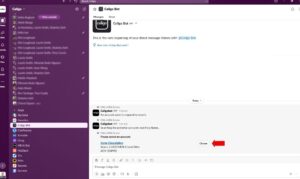
Step 1: User enters Account name in Slack Channel
User:
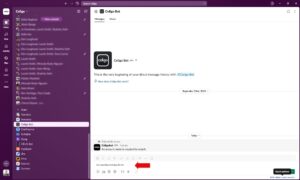
An account manager types /account-summary in Slack and begins entering the account name, such as “Acme.”
Celigo:
- Listens for the Slack bot event.
- Queries Salesforce for matching account records.
- Responds with a list showing account name, ACV, and a direct Salesforce link.
Outcome:
The user can instantly select the correct account without leaving Slack (next step).
Step 2: Select the Account
User:
Selects customer “ Acme Chocolatiers” from the returned list.
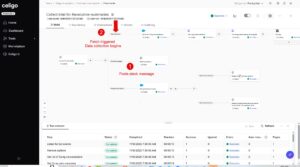
Step 3: Trigger the Orchestration Flow
Celigo:
- Receives the Slack event (user selection “Choose”) and confirms the account in Salesforce.
- Summary flow is triggered and data collection process begins, starting with Salesforce
Step 4: Retrieve Gong Data – Recent Calls and Transcripts
Celigo:
- From Salesforce, identifies the last 10 Gong calls associated with the account.
- Fetches call metadata and transcripts for analysis.
Outcome:
The Gong workflow captures current customer sentiment, open issues, and next steps directly from real conversations.

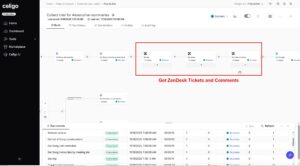
Step 5: Retrieve Zendesk Data – Open Tickets and Comments
Celigo:
- Finds the corresponding Zendesk organization.
- Retrieves open tickets and full comment threads.
Outcome:
Summary data will highlight blockers or escalation points that could impact the customer relationship.
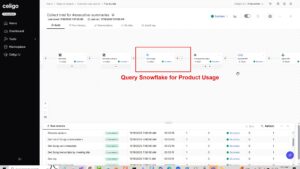
Step 6: Retrieve Product Usage Data from Snowflake
Celigo:
- Queries Snowflake for product usage and adoption metrics.
- Normalizes data for inclusion in the summary.
Outcome:
Product usage metrics will quantify the value Celigo is currently providing to the customer and identify expansion opportunities.
Step 7: Clean and Structure the Data for AI Summarization
Celigo:
- In Snowflake, cleans and structures all data inputs: accounts, contacts, Gong calls, Zendesk tickets, and Snowflake usage metrics.
- Prepares a unified dataset for AI summarization.
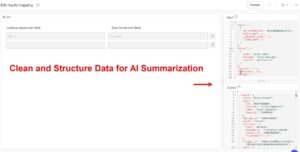
Outcome:
Ensures all fields are standardized and data are cleaned for accurate, consistent results for data summary.
Step 8: Summarize Data with OpenAI
Celigo:
- Sends curated data and a pre-set prompt to OpenAI, configured with the selected model, temperature, and guardrails.
- Receives a structured JSON output aligned with a pre-approved schema.
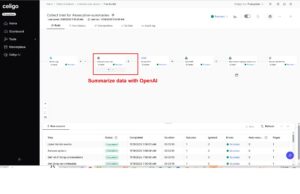
Outcome:
Generates a structured JSON file derived from multiple data sources, use to create an accurate Customer360 summary
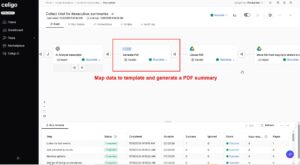
Step 9: Render the Customer 360 PDF
Celigo:
- Maps the AI-generated JSON to a sales and marketing PDF template.
- Creates a formatted report including summaries, metrics, and insights.
Outcome:
Produces a polished artifact ready for executives, Account Executives, and Customer Success Managers.
Step 10: Store and Share the Report
Celigo:
- Uploads the final PDF to a Google Drive shared folder for visibility across teams.
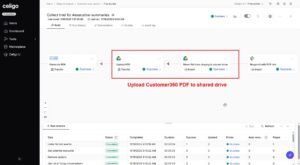
Outcome:
The document becomes a reusable asset for QBRs, reviews, or follow-ups.
Step 11: Notify User in Slack
User:
A Slack message appears confirming completion, with a link to open the Executive Summary.
Celigo:
Posts the Google Drive link dynamically to the user’s Slack channel.
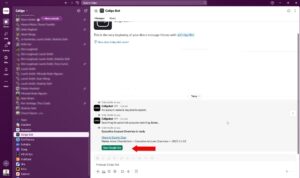
Outcome:
Users access and open the report in one click, no switching between software applications
Step 12: Open and Review the Report
User:
- Opens the PDF summary, which displays:
- Customer profile and quick overview
- Key stakeholders
- Usage and endpoint data
- Contract dates
- Red flags with live Zendesk links
- Strategic discussion points, priorities, and growth opportunities from Gong, Zendesk, and Salesforce
Outcome:
Instant preparation for customer calls—enabling faster, more informed decision-making and accelerated sales cycles.
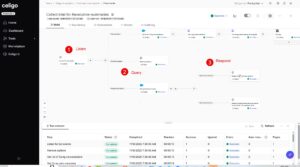
Step 13: Review Run History for Errors
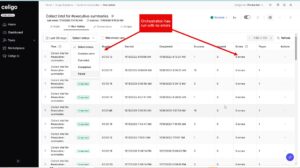
Admin User can:
- View detailed execution history for every flow run, including success, failure, and retry status.
- Inspect request and response data for each step to validate accuracy and troubleshoot issues.
- Trace errors directly to specific flow steps with full context for faster resolution.
- Access detailed logs and debugging information to analyze performance and pinpoint root causes.
- Monitor data volumes, processing time, and error trends to optimize overall flow performance.
- Ensure automations are running smoothly, reliably, and at peak efficiency.
Outcome
This enables admins to quickly detect, diagnose, and resolve issues—ensuring every automation runs efficiently, accurately, and without disruption
Summary
Unlike legacy integration tools that depend on heavy developer lift and rigid frameworks, Celigo unifies technical and business teams in a single, intelligent environment. Every workflow—whether built by IT or initiated by a business user—runs on a shared foundation of governance, observability, and AI-driven adaptability. The result is a modern automation platform that provides enterprise reliability with the agility organizations need to respond quickly, refine processes, and stay ahead of change.
“Five years ago, I would have told you I needed MuleSoft. But now Celigo can actually handle everything I need. I can take a Shopify order, route it to NetSuite based on the locations Shopify assigns, and have NetSuite create multiple fulfillments across those locations. Celigo and has really changed what’s possible” – VP of IT at a Luxury Fashion Brand
Celigo Pros
- Build powerful workflows in a simple, visual interface
- Accelerate development with AI-assisted design, 1,000+ prebuilt connectors
- Enable both IT and business users to collaborate with shared visibility and control
- Automatically resolving 95% of errors at scale.
- Supports anything from predictable workflows to fully agentic operations as technology matures
- Unifies application integrations, data pipelines, APIs, B2B/EDI flows, AI workflows, and autonomous agents in a single governed environment
Celigo Cons
- Not a white-label embedded iPaaS. Product teams needing fully embedded branding may prefer purpose-built white-label tools.
Customer rating
- G2:4.8
Boomi
Boomi is an iPaaS platform primarily designed for technical users, with some low-code capabilities available. It targets enterprises that require a broad suite of integration tools, including API management, EDI, Master Data Management (MDM), and workflow automation (Boomi Flow). Several of these capabilities are either acquired such as Flow and APIM, or archaic like MDM.
As an alternative to MuleSoft, Boomi offers a broad unified platform through a low-code visual interface, connector library, and unified runtime. Choose Boomi if you are looking for a “friendlier” iPaaS for common SaaS and hybrid integrations.
Key Capabilities
- iPaaS covering app integration, workflow automation, APIM, MDM, B2B/EDI
- Pricing is based on connector capacity with message caps
- Ideal use case includes hybrid/cloud integrations
- Designed for developer-centric users
Boomi pros
- Hybrid deployment flexibility
- Broad feature suite (API, MDM, EDI)
- Enterprise-grade security and governance
Boomi cons
- Legacy architecture
- Developer-centric, despite being less complex than MuleSoft
- Pricing can increase with scale
Customer rating
- G2: 4.4
Jitterbit
Jitterbit is an iPaaS that focuses on API integration and automation solutions. Originally an on-prem solution, they evolved its product offering to address the need for integrating both on-premise systems and cloud-based solutions.
As an alternative to MuleSoft, Jitterbit offers a lighter-weight, low-code integration platform that emphasises speed and business process automation rather than full enterprise API governance depth. Choose Jitterbit if you have a divisional initiative integrating for popular SaaS/ERP/CRM.
Key Capabilities
- iPaaS, API, and EDI integration platform
- Drag-and-drop workflow design
- Prebuilt templates and connectors for popular SaaS and ERP systems
- Cloud and hybrid deployment
- Connection-based pricing model
- Built for citizen integrators and developers
- Suitable for API and data migration use cases
Pros
- Fast deployment
- Prebuilt templates
- Cost-effective
Cons
- UI is not as modern
- Limited governance depth
- Reliability varies in large-scale workloads
Customer rating
G2: 4.5
Workato
Workato is a cloud-based integration and automation platform with a low-code/no-code interface. It began as a task automation platform, which later evolved into an Integration Platform as a Service (iPaaS).
As an alternative to MuleSoft, Workato offers a unified low-code platform for integration, API, process, and AI orchestration. With prebuilt “recipes,” a drag-and-drop builder, and AI-powered automation, it enables business and IT teams to handle medium-complexity workflows with ease.
Key Capabilities
- Supports iPaaS, API, EDI (through Orderful partnership), and embedded
- Low-code/no-code “recipe” builder for automating workflows
- Prebuilt connectors and community recipes for popular SaaS apps
- Supports cloud and hybrid integration
- Task-based and recipe-based pricing
- Ideal for marketing and sales automations
- Business-friendly UI, needs ongoing IT support for complex use cases
Pros
- Modern UI
- Large connector library
- Easy for business users
Cons
- Complex use cases, exception handling requires ongoing IT support
- Not suitable for high volume, potential surprise price hikes
- Limited for deep ERP or legacy use cases
- EDI is not native, Orderful partnership adds complexity
Customer rating
G2: 4.7
Zapier
Zapier is a workflow automation tool designed for simple point to point use cases for small to medium-sized businesses. The platform focuses on no-code integrations and task automation, serving organizations that need to connect SaaS apps quickly without IT involvement.
As an alternative to MuleSoft, Zapier offers a lightweight, no-code approach to automating workflows. Organizations use Zapier to streamline repetitive tasks, automate cross-app data flows, and improve productivity without developer dependency.
Key Capabilities
- No-code visual builder for creating automated workflows (“Zaps”)
- 8,000+ app connectors; task-based workflows
- Pricing tiered, based on # of tasks, # of users and AI features as add-ons
- Best for simple uses cases only
- Designed for business users
- Cloud-based deployment with simple trigger-action logic
Pros
- Easy setup
- Broad app coverage
- Fast time-to-value
- Cost effective
Cons
- Limited scalability for growing companies
- Not suited for complex data transformations, APIM, and EDI needs
- Minimal governance features
Customer rating
G2: 4.5
Snaplogic
SnapLogic is an integration platform solution designed for both IT teams and business-technical users. The platform focuses on application, data, and API integration with a unified, low-code interface, serving organizations that need to connect cloud, on-premises, and hybrid systems.
SnapLogic offers a low-code platform with broad connectivity and visual pipeline design. With prebuilt “Snaps” and support for batch, streaming, and real-time data, it’s best suited for cloud-centric, data-driven workflows requiring speed and moderate complexity.
Key capabilities:
- Supports application, data, and API integration
- Low-code visual designer supporting batch, streaming, and real-time data flows
- Prebuilt “Snaps” for major enterprise and cloud applications
- Hybrid deployment
- Pricing structure – Business/Enterprise bundles
- Ideal use cases include cloud migration and data warehousing.
Pros:
- Broad connector coverage
- Low-code visual builder
- Good customer support
Cons:
- Complex for small teams
- Less mature API governance
- Performance issues when dealing with high volume
Customer rating
G2: 4.3
Informatica (acquired by Salesforce)

Informatica is primarily a data integration & data management solution, acquired by Salesforce in 2025, now owned by the same parent company as MuleSoft.
As an alternative to MuleSoft, Informatica is often chosen by organizations that prioritize data quality, governance, and analytics over application or workflow integration. It’s a strong fit for data-centric use cases involving pipelines, master data, governance, and the integration of large volumes from diverse sources.
Key capabilities:
- Intelligent Data Management Cloud (IDMC) for data integration, MDM, cataloging, and quality
- AI engine (CLAIRE) for automated data mapping, lineage tracking, and metadata discovery
- Multi-cloud and hybrid deployment with connectors for on-prem and SaaS systems
- Usage pricing, based on Informatica Processing Units (IPUs)
- Ideal use case includes data integration/governance
- Built for admin/architect-oriented suites
Pros:
- Proven enterprise support
- Strong metadata management
- Broad connector support for legacy systems
Cons:
- Legacy, complex architecture
- Steeper learning curve and higher implementation effort
- Less emphasis on application integration and APIM
- Overkill for pure application-integration use cases
Customer rating
G2: 4.5
Tray.io

Tray is a cloud-native integration & automation platform (iPaaS/low-code) designed for integration specialists and business technologists. The platform focuses on no-/low-code workflow automation and app integration.
As an alternative to MuleSoft, Tray.io offers a lighter-weight, business-user-oriented automation/connector-first platform. Suited for departmental automations, GTM stack integrations, and rapid SaaS workflows with moderate complexity.
Key capabilities
- Supports visual builder, API connectivity, and embedded
- Low-code customization with optional JavaScript and API steps
- Cloud-native deployment
- Tiered pricing with usage components: # of workspaces, # of tasks, # of API calls, various add-ons
- Ideal for cross-app data syncs, HR automations
- Suitable for business technologists, advanced functions need developer oversight
Pros
- Modern UI
- Cost-effective for lighter automation
- Prepackaged integrations and connectors
Cons
- Limited performance at very high scale
- Occasional UI lag in complex workflows
- Not suitable for complex use cases
- Lacks streamlined capabilities – switching workspaces, organizing workflows
Customer rating
G2: 4.5
n8n

n8n is an open-source workflow automation platform. It enables users to connect applications and automate complex business processes using a visual, node-based interface. It serves organisations that need to build custom automations rapidly, integrate many apps, and keep control over hosting/data.
As an alternative to MuleSoft, n8n provides a lightweight, flexible, open-source automation and integration tool rather than a full-featured enterprise platform. It’s well-suited for small teams with developer resources that need quick, customizable workflows and are operating with budget constraints.
Key capabilities
- Visual node-based workflow builder supporting hybrid code and no-code automation
- Prebuilt nodes for SaaS and system integrations
- Self-hosted and cloud deployment options
- Usage pricing, based on # of workflow executions, and hosting type
- Ideal use case includes developer-led automation, API orchestration, internal tool building.
- Built for developers, not business-friendly
Pros
- Full control over data/infrastructure, reduces vendor lock-in.
- Flexible for custom workflows and smaller teams
- Cost-effective for smaller scale use‐cases.
Cons
- Lacks enterprise grade features, SLAs, mature connectors
- Developer centric, high maintenance due to self hosting
- Open source, lacks security
- Not suitable for high-volume
Customer rating
G2: 4.8
Apigee (acquired by Google)
Apigee is an API management solution, acquired by Google in 2016, and rebranded as Google Cloud’s native API management tool. The platform focuses on managing, securing, publishing, and analysing APIs and serves organisations that need to expose backend services, support internal/external developer ecosystems, and build API-led architectures.
As an alternative to MuleSoft, Apigee offers a pure API-first architecture. Choose Apigee when your priority is API-first — exposing services, partner APIs, digital channels, API monetization, and traffic control.
Key Capabilities
- Full API management lifecycle (design, secure, publish, analyze), hybrid options.
- Hybrid and multi-cloud support for both on-prem and cloud workloads
- API-led programs, developer ecosystems
- Pay-as-you-go, based on # of API calls, environments, and add-ons for analytics/security
- Suitable for developers/architects
Pros
- Enterprise-grade API security
- Scalable hybrid deployment
- Deep analytics and monitoring
Cons
- API-only focus
- Complex enterprise setup
- Over-engineered for simpler automation or non-API use-cases
Customer rating
G2: 4.4
Choose the right MuleSoft alternative for your business
The ideal MuleSoft alternative depends on factors like integration needs, resources available, and business priorities. Each platform in this guide offers distinct strengths, ranging from low-code design to data-centric governance. Celigo is a compelling choice for organizations that value robustness to handle any use case, fast deployment, operational scale, and usability across both technical and business teams.
Ready to evaluate your options?
Schedule a personalized demo or start a free trial to see how Celigo can support your integration strategy.
Frequently asked questions
How do MuleSoft alternatives compare on pricing?
Pricing varies significantly across alternatives.
- Budget-conscious organizations often consider Zapier or n8n, but with very limited capabilities
- Enterprise solutions like Boomi, Informatica offer comprehensive features at higher price points
- Celigo, Jitterbit offer more predictable pricing and better value for money overall
Consider total cost of ownership, including implementation, training, and ongoing support costs, when evaluating pricing.
What are the main reasons organizations switch from MuleSoft?
Common migration drivers include:
- Highly complex, overkill for their needs
- Long implementation cycles and dependency on MuleSoft-certified developers.
- Limited self-service for business user
- Slow scaling for new integrations or automations.
- Maintenance complexity tied to version upgrades, exception handling, architecture.
- High TCO from vCore and message-based pricing.
Organizations moving to platforms like Celigo often cite enabling internal IT, faster time-to-value and lower operational overhead as key motivators.
How long does it take to migrate from MuleSoft?
Migration timelines depend on integration volume and complexity:
- Simple use cases (like CRM–ERP syncs) may take 1–2 months.
- Enterprise migrations with custom APIs or EDI workflows can take 3–6 months.
Platforms like Celigo offer implementation support (PS or Partner), prebuilt connectors and templates, expert onboarding and advisory hours to streamline the transition. Many buyers start with a pilot project to get internal IT familiar with the platform and then gradually migrate the entire integration.
Do MuleSoft alternatives offer similar integrations?
- Apigee leads for enterprise API lifecycle management.
- Celigo, SnapLogic and a few others provide API management alongside application integration and workflow automation, striking a balance
Review your current integration requirements and ensure your chosen alternative supports critical connections to your technology stack.
How can Celigo help organizations transitioning from MuleSoft?
Celigo offers a unified iPaaS and automation platform with AI-assisted integration design, prebuilt templates, and error management automation. Customers migrating from MuleSoft often see:
- Deployment times cut by 50–70%
- Empowering internal IT instead of relying on specialists or partners
- Maintenance reduced through AI error resolution, other built in features
Integration insights
Expand your knowledge on all things integration and automation. Discover expert guidance, tips, and best practices with these resources.