How to build scalable NetSuite EDI integrations
 Updated Jan 27, 2026

When managing supplier-side EDI in NetSuite, teams often run into the same challenges: each trading partner uses slightly different formats, EDI specs change regularly, and expectations around processing purchase orders, fulfillments, invoices, and acknowledgments leave little room for error.
NetSuite EDI integration automates these document exchanges, reducing manual work, errors, and delays while enabling real-time visibility across systems.
Celigo’s NetSuite EDI template provides a structured, scalable approach to these challenges. Instead of building one-off flows for each trading partner and transaction type, the template offers a modular foundation where standardized logic is reused across partners, and partner-specific requirements are isolated in configurable components.
NetSuite EDI template overview
In this walkthrough, you’ll learn how to use the NetSuite EDI template to configure, customize, and deploy transaction flows.
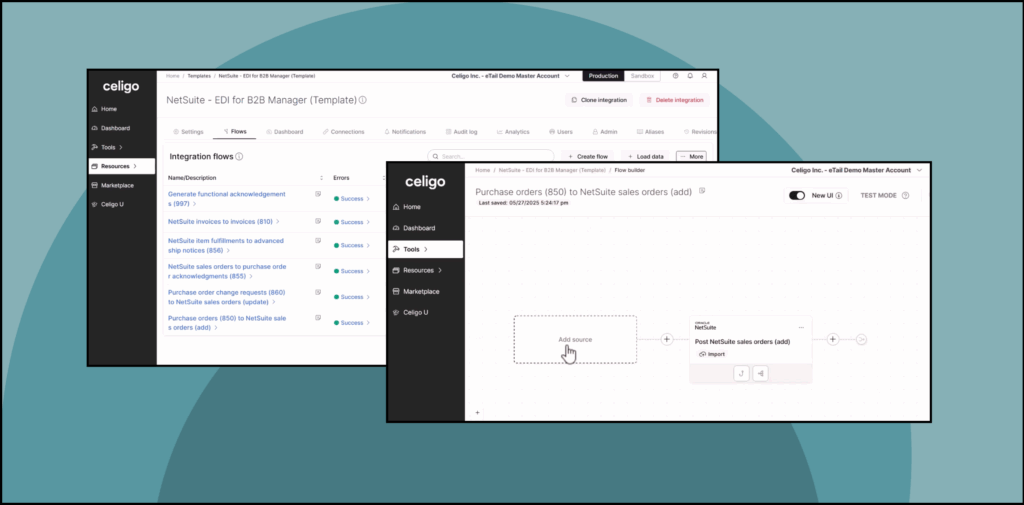
Each supported EDI transaction, such as 850 (Purchase Order), 856 (Advance Ship Notice), or 810 (Invoice), is delivered as a base flow. These flows can be cloned, customized, and versioned per trading partner without affecting the shared core logic. This makes it easier to onboard new partners, apply updates, and maintain consistency across a growing EDI footprint.
Configuration, including field mappings, EDI schema selection, validations, error handling, and transport method, is handled entirely within the UI. No scripting, middleware, or external tools are required. That makes initial deployment faster and enables integration and operations teams to manage updates without writing code or depending on third parties.
The result is a NetSuite EDI integration model built for long-term scale: maintainable, auditable, and well-suited to high-volume, multi-partner supplier ecosystems.
Included EDI transactions
The template supports core X12 transactions mapped directly to NetSuite-native records and is fully compatible with both X12 and EDIFACT standards, making it effective for domestic and international trading partners alike.
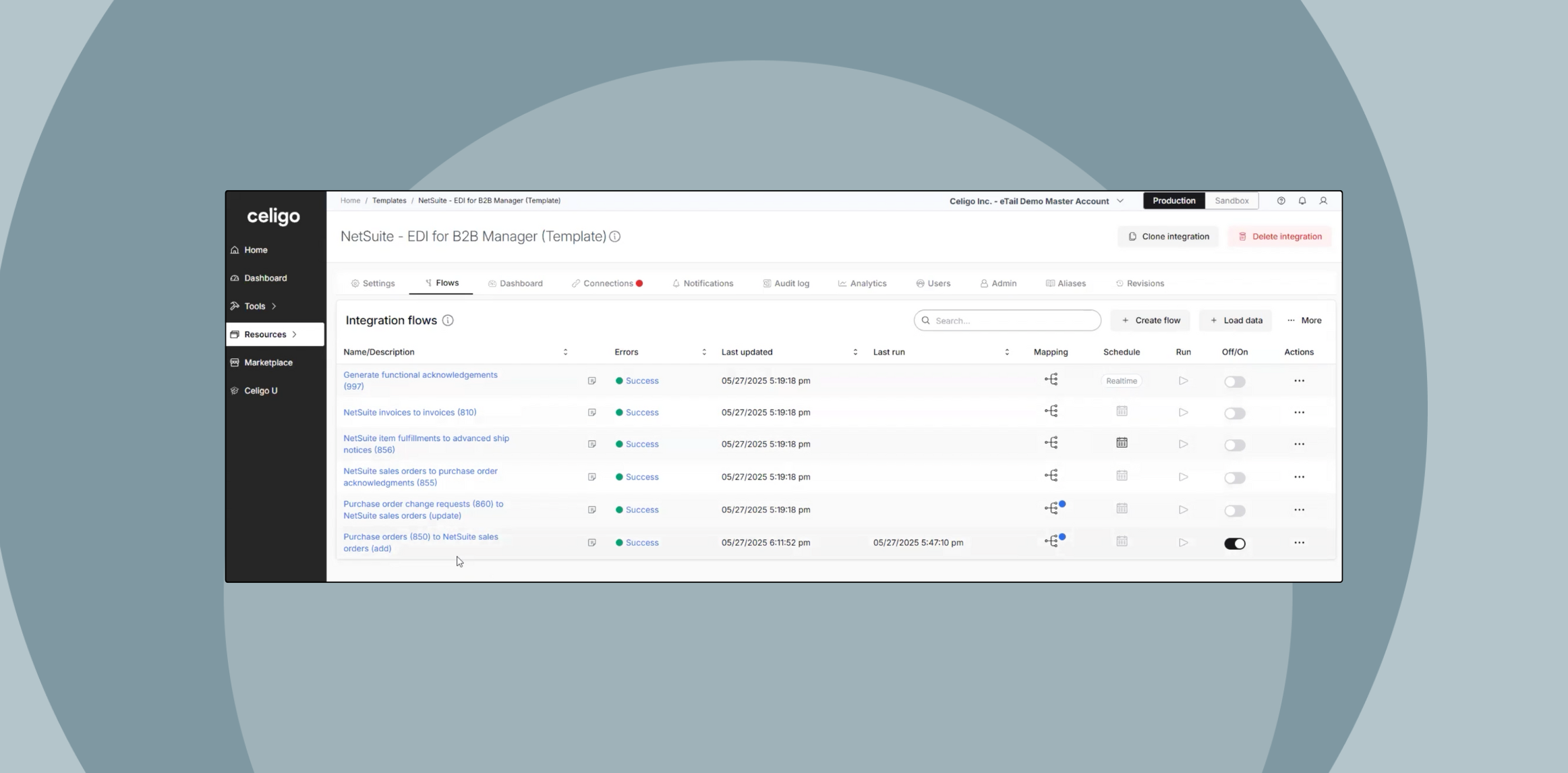
It includes six prebuilt X12 transaction flows, each partially configured and ready to map to NetSuite records.
850 – Purchase Order
Creates NetSuite Sales Orders from inbound EDI 850s. Supports SDQs, UOM conversion, and partner-specific fields.
855 – PO Acknowledgment
Sends acknowledgments from NetSuite Sales Orders. Configurable for full/partial acceptance or line-item-level updates.
856 – Advance Ship Notice
Generated from Item Fulfillments. Supports carton/pallet hierarchy, SSCCs, and external 3PL enrichment.
810 – Invoice
Converts NetSuite Invoices into EDI 810s. Includes tax, freight, discounts, and custom segment handling.
860 – PO Change Request
Applies updates to existing Sales Orders from inbound 860s. Supports merge, replace, or manual review logic.
997 – Functional Acknowledgment
Confirms receipt of inbound documents. Tracks control numbers and supports compliance tracking.
How to configure NetSuite EDI flows for scale
The template supports cloning and customizing flows for each trading partner. This structure allows you to scale across dozens or hundreds of partners while keeping maintenance overhead low.
To configure a flow:
- Clone a base flow (e.g., 850 Purchase Order) into a new flow group for a specific partner
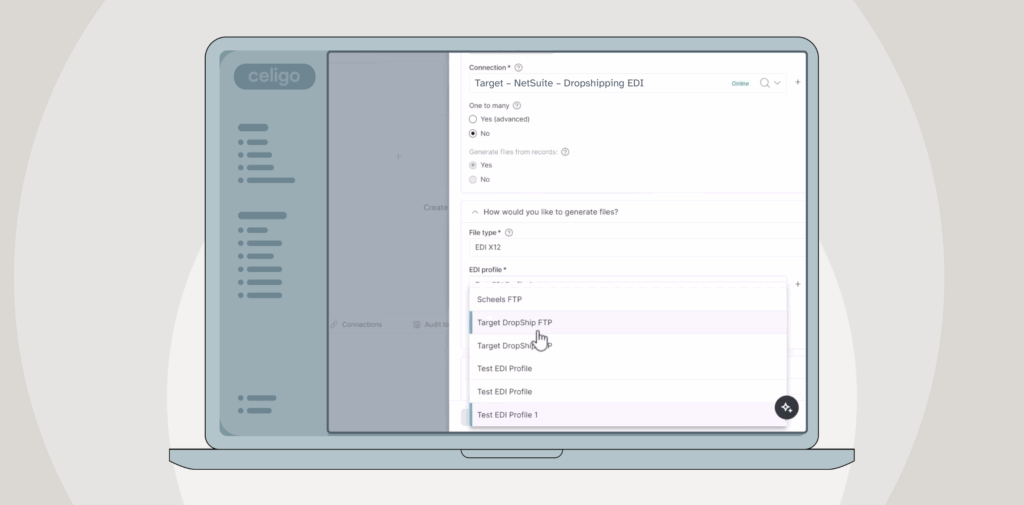
- Assign an EDI profile, such as Costco 4010 or Target 4030
- Map parsed EDI JSON fields to NetSuite records using the visual UI
- Define partner-specific routing or validation logic as needed
- Repeat this process for each relevant transaction type (e.g., 855, 856, 810)
If a partner updates their spec, you only update that partner’s flow; shared logic across other flows remains unchanged.
Built-in monitoring and error management
Each NetSuite EDI flow built from the template includes integrated monitoring and diagnostic tools that reduce troubleshooting time, support audit readiness, and eliminate the need for custom scripts or third-party dashboards.
Several key outcomes include:
Faster issue detection
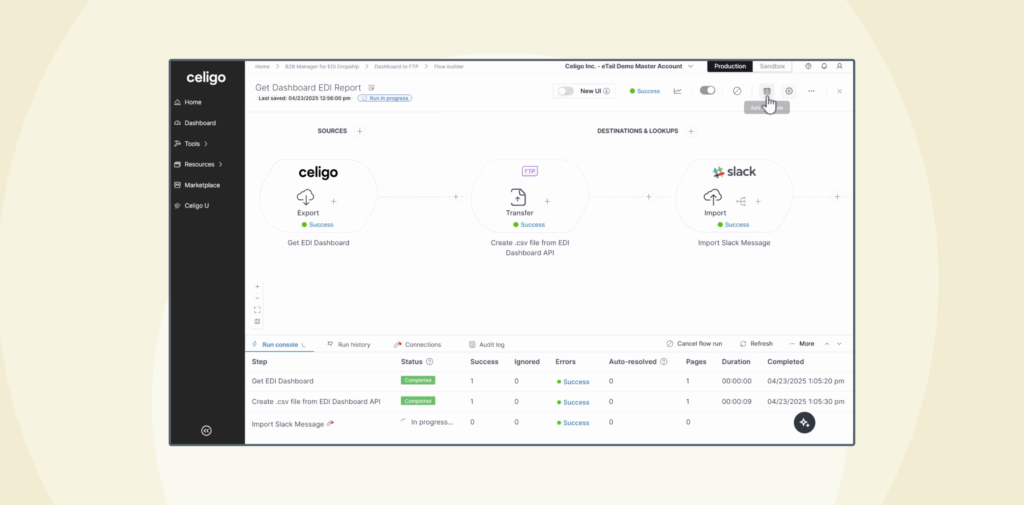
Real-time execution tracking shows which steps succeeded or failed, how long each phase took, and where failures occurred—helping teams respond before issues escalate.
Root-cause visibility
Field-level error diagnostics are tied directly to EDI segments (e.g., invalid N1, missing DTM), eliminating the need to inspect raw payloads or guess where problems occurred.
Immediate resolution and retry
Failed flows can be reprocessed directly from the dashboard after corrections—no manual file reloads or re-entry required.
Complete transaction traceability
Each document is indexed by control number, making it easy to search for, trace, and verify the lifecycle of any transaction, applicable for operations, finance, and support teams.
Change tracking and rollback
Version history and audit logs track all changes to mappings, schema definitions, and routing logic, enabling rollbacks and ensuring compliance.
These tools allow teams to manage NetSuite EDI transactions with confidence and clarity, at scale, and without external dependencies.
Transport methods and partner profiles
The NetSuite EDI template supports a range of standard transport protocols, allowing teams to choose the method that matches each partner’s requirements:
- AS2 – Secure, point-to-point EDI messaging
- FTP/SFTP – Common file-based transport with credentialed access
- VAN – For partners still using value-added networks
- API-based exchange – For partners that support direct integration outside traditional EDI
Each partner can use a different transport, and these settings are defined per connection, without affecting core flow logic.
Partner profiles are managed in a shared catalog, which includes:
- Predefined EDI schemas (e.g., Costco 4010, Target 4030)
- Logo and metadata for visual clarity
- Connection configuration settings
- Schema version tracking
This approach simplifies onboarding, maintains consistency across flows, and reduces manual configuration for each new trading partner.
Advanced extensions
While the template covers core supplier-side EDI transactions out of the box, it can be extended to support more complex workflows and partner-specific logic.
Common extensions include:
SDQ routing and multi-location fulfillment
Handle orders with multiple ship-to locations using standard SDQ breakdown logic, without creating separate flows per destination.
ASN packaging logic with 3PL data
Pull packaging hierarchy, weights, and SSCC details from external 3PL systems and embed them into EDI 856 flows.
Custom validations for inbound documents
Block documents that fail business rules (e.g., missing location codes, unexpected UOMs) before they reach NetSuite.
JavaScript-based field transformations
Apply advanced logic where low-code mapping isn’t sufficient—e.g., dynamic date conversions, conditional data reshaping.
Role-based access and flow deployment controls
Limit who can configure, deploy, or edit flows based on team roles, supporting audit and environment governance.
These extension points allow teams to support non-standard partner requirements, legacy processes, or particular compliance scenarios, without losing the benefits of the base template structure.
Benefits of NetSuite EDI integration
The template delivers benefits across teams responsible for building, managing, and supporting supplier-side EDI in NetSuite:
Faster onboarding
Launch new partner integrations without building from scratch—using prebuilt flows and profiles.
Reduced maintenance overhead
Update mappings, logic, or partner schemas without affecting shared flows or other configurations.
Improved visibility and control
Monitor execution in real-time, trace errors to exact EDI segments, and manage reprocessing without leaving the platform.
Support for internal ownership
No scripting or external middleware required—flows are managed directly by integration or operations teams.
Consistent governance
Centralized versioning, audit trails, and role-based access ensure changes are tracked and secure.
This approach helps teams deliver EDI functionality that’s not just working, but sustainable as the business grows.
A scalable foundation for NetSuite EDI
The NetSuite EDI template gives teams a structured and scalable way to manage B2B transactions across dozens of trading partners, all within a single, governed platform.
Whether you’re implementing your first 850 or maintaining a complex network of 856s and 810s, the template provides the control, consistency, and visibility needed to scale NetSuite EDI without added complexity.
Integration insights
Expand your knowledge on all things integration and automation. Discover expert guidance, tips, and best practices with these resources.