Celigo January 2026 Release
 Updated Jan 29, 2026

Celigo’s January 2026 release is live!
This release introduces MCP Server, a new on‑prem file connector, improved execution visibility, a new visual experience for multi‑instance flows, and more.
Platform
AI agent integration with Celigo MCP Server
We’re excited to announce the general availability of the Celigo MCP Server, the standardized way to expose your Celigo APIs, integrations, and logic to AI Agents securely, using the Model Context Protocol (MCP).
The MCP Server transforms your internal automations into a stable, scalable foundation for AI-powered flows, enabling your AI assistants and agents to reliably discover, understand, and invoke your business capabilities with clarity and control.
→ Read more about Celigo’s MCP Server
Multi‑instance flows: New UX
We’ve introduced a new visual editor for multi-instance flows, a more user-friendly way to select customizable fields, and create instances.
With multi-instance flows, you define core integration logic once in a base flow, then generate instances that override only what’s different, like connections or mappings. Each instance runs independently, while updates to shared logic can be made centrally from the base.
This makes it easier to scale, manage, and maintain variations across environments or business units.
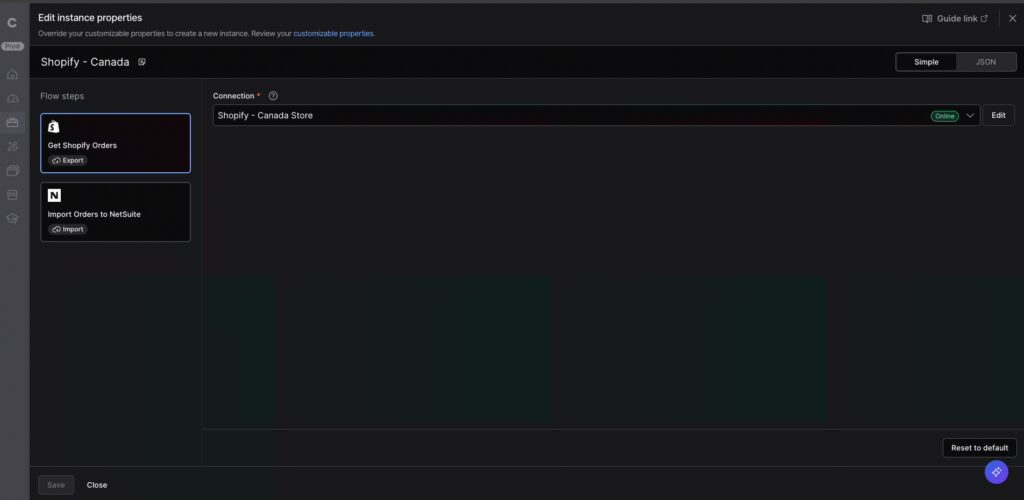
→ Learn more about the new visual editor
Execution logs: Achieving end-to-end operational visibility
A highly anticipated feature, execution logs provide record-level insight into what happened during the processing of a given record. They capture how each record moved through a flow run and whether it succeeded, failed, or was ignored, giving a clear view of execution at both the run and record level.
This makes troubleshooting and validation faster and more consistent by providing a single place to see what happened in a run and drill into individual records when needed.
→ Learn more about execution logs
Enhanced Run history to show retry and in-progress jobs
Run history now includes details for all “retry jobs” (which previously appeared only in error management), as well as “in-progress jobs” (which previously appeared only in the Run console).
These changes allow the Run history view to serve as the single place to go for visibility for all current and historical runs.
Preview and mock data enhancements
The mock and preview experience has been refined for better clarity and flexibility:
- Improved record exploration with tree view support and multi‑record focus
- Resizable configuration pane for side‑by‑side record and config context
- Clearer Simple/HTTP toggle placement to highlight the affected configuration
- Mock data difference indicator to highlight discrepancies between saved mocks and real input
Navigation enhancements
We’ve updated the left navigation menu to make it easier to find integration-development features.
- “Tools” is now “Build”, aligning navigation with intent
- “Agents” is now “On‑premise agents” to provide clearer context on their role and usage
- Resizable and reorderable table columns retain user‑specific preferences for customized views
→ Read the full January release details in our KB
B2B Manager for EDI
Flexibility in transferring and working with EDI files
EDI exports/imports using the AS2 and VAN connections now include an option to process files without automatic parsing, allowing you to access and work with raw files.
This option provides greater flexibility for complex or non-standard EDI use cases and gives advanced users more control for debugging, validation, and custom transformation workflows.
API Management
Track your API usage in the Subscription page
You can now view API usage and entitlements directly in Account → Subscription within integrator.io.
Usage includes:
- Custom APIs built with API Builder or JavaScript
- Import and export APIs
- APIs proxied through API Management
You’ll also see a breakdown of API call usage, allowing you to sort and filter by environment and API type, to identify your most frequently used APIs and uncover valuable insights.
Each account includes a built-in monthly allotment of API calls, with the flexibility to scale through additional API call add-ons or API Management. Historical usage data is also available, making it easy to choose the plan that best fits your needs.
Connectivity
Access local files with the new on-prem file connector
The on-prem file connector allows you to access files stored in a secure environment, such as private networks that can’t be accessed directly. With this new connector, you can build automations that retrieve files from local storage and push them to a cloud system.
→ Get a closer look at the on-prem file connector
Maximum connection concurrency increased
For eligible subscriptions, we’ve increased the maximum configurable concurrency per connection from 25 to 50, providing additional capacity for high-volume integrations and enabling faster end-to-end processing. This change does not affect existing connections.
To take advantage of the higher limit, update Max concurrency in the connection settings — now configurable from 1 – 50.
Get more visibility while testing or creating a connection
We’ve introduced a Connection Debug Assistance panel that provides HTTP request/response details during connection testing. This helps troubleshoot connection configuration issues, especially for OAuth calls.
Real-time SQL Server CDC exports
Change Data Capture (CDC) for SQL Server is now available. This provides a low-impact alternative to heavy full-table scans and frequent polling of production databases. CDC streams only row-level inserts, updates, and deletes in near real time, so you can use the same change feed both to drive app-to-app integrations and to land before/after versions of each row into your analytics database or warehouse for history tracking and reporting.
Enable PUT requests for webhook endpoints
Webhook listeners now support PUT requests in addition to POST, enabling seamless integrations with SaaS platforms, such as Zoho, that use PUT for record updates. PUT requests are handled the same way as POST—including payload processing, filters, authentication, size limits, and downstream logic—while existing POST-only configurations continue to work without any changes.
Integration Apps / Templates
Provision custom integration apps for multiple environments
Integration app developers can now provision licenses across multiple environments at a global level, allowing greater flexibility in license allocation. Register and maintain your apps more efficiently, reduce manual overhead and complexity for RevOps, and allow customers to deploy apps across environments with consistent licensing.
Shopify – NetSuite IA | Native exchange support for online and POS orders
The Shopify – NetSuite Integration App now supports Shopify’s native exchange process across both online checkout and POS channels. Instead of creating separate Return and Order Edit records, the app now generates a single consolidated Return record in NetSuite that contains both returned and replacement items.
This enhancement simplifies return processing, aligns with Shopify’s latest exchange model, and ensures consistency across channels.
Key changes:
- Unified handling for Shopify Admin and API-created exchanges
- A single Return record for each exchange
- Legacy ExchangesV2 is deprecated and will be removed following Shopify’s one-year transition period
Walmart – NetSuite IA | OAuth 2.0 Support + Migration from Wrapper to HTTP
To meet Walmart’s OAuth 2.0 requirement (effective February 28, 2026), all Walmart – NetSuite Integration App flows are migrating from Wrapper connections to HTTP-based OAuth 2.0 connections.
What’s changing:
- All Wrapper-based flows (Orders, Fulfillment, Inventory, Pricing) will run on OAuth-enabled HTTP connections
- Flow mappings and schedules will be preserved during migration
- Users must authenticate a new OAuth 2.0 connection and update flows when prompted
This ensures continued API compatibility and minimizes integration disruption.
CAM – NetSuite IA | Unique Account Numbers for Multi-Instance Installs
When CAM is installed in multiple environments—or multiple times within the same NetSuite account under a shared license—the app now automatically assigns a unique 7-digit account number to each installation.
This prevents rule conflicts and ensures that each CAM instance is uniquely identified in NetSuite.
ICYMI: New AI-powered integration templates
Build agentic AI workflows with 20+ new prebuilt AI templates. Explore our library of prebuilt AI integration templates designed to help teams orchestrate agentic workflows across Finance, RevOps, Support, HR, and more.
Integration Marketplace
New connectors available
17 new API connectors, expanding region support, and application coverage. Enhancements continue across API and EDI connectors, including support for global regions and GraphQL updates.
- Check out the new HTTP connectors available in the Integration Marketplace.
- The EDI trading partners article provides an alphabetical listing of trading partners, search functionality, and filters.
Looking for more?
For more on integration strategies and real-world applications, Builder’s Hub provides tutorials and video demos for builders and IT teams.
Access step-by-step tutorials, product demos, and review best practices for building, managing, and scaling integrations.
Integration insights
Expand your knowledge on all things integration and automation. Discover expert guidance, tips, and best practices with these resources.